Image to Layers
Current: GIF Face Swap

GIF Face Swap — Put Your Face in Any Reaction GIF

GIF Face Swap by Image to Layers puts the face from your photo onto one person in a GIF or short clip and asks the model to hold the motion.

Upload a GIF

GIF face swap

Whose face changes

The largest, most central face in the GIF.

What changes

New face; the original hair, clothes and body stay.

Output size

Plenty for chat GIFs; costs less.

Your face-swapped GIF appears here

Upload a GIF and a face photo. The GIF is converted in your browser before anything is charged.

The Image to Layers GIF face swap is made for reaction GIFs, memes and group-chat jokes: upload a GIF or a 2–10 second MP4, MOV or WebM plus one clear face photo, choose whose face changes, and get a silent MP4 that turns into a looping GIF in your browser. A swap costs from 88 credits (up to 4 seconds at 480p, about $1.19 on Pro monthly). There is no free swap and no added watermark.

Updated

How the face swap works

  1. Step 1: Upload a GIF or short clip

    Drop in an animated GIF or an MP4, MOV or WebM video. Your browser converts it to an MP4 before upload: the first 10 seconds are used, and a loop shorter than 2 seconds is repeated to reach 2.

  2. Step 2: Add one face photo

    Upload a sharp, front-facing photo of the new face (JPG, PNG or WebP up to 10 MB, at least 256 px). Faces you have permission to use only.

  3. Step 3: Choose whose face and how much

    Pick Main face, Left, Middle or Right, or describe the person. Choose Face only or Face + hair, then 480p or 720p; the button shows the exact credits for your clip.

  4. Step 4: Swap, then download a GIF or MP4

    Both files go through the video model’s review, then Seedance 2.5 edits the clip with a prompt that asks it to change only that face and follow the original expressions and timing. Results vary with the GIF and photo. Download GIF builds the loop in your browser.

Face swap GIF examples

Three short loops next to face-swapped versions, to show what a swap changes and what stays: the pose, timing, clothes and background remain while the face is replaced.

Original GIF
Swapped GIF

Selfie grin and blink

A 2.5-second selfie loop of a man in a white T-shirt grinning, blinking and tilting his head in a bright room full of monstera plants. In the swapped GIF a different man wears the same grin and blink at the same moments, while the hair, T-shirt and plants stay as they were. No face photo was published with this pair, so only the before and after are shown.
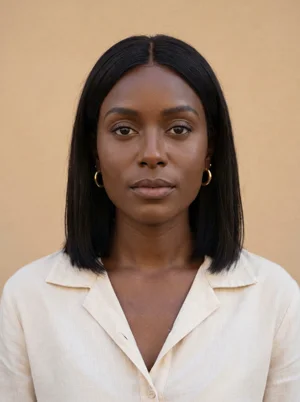

front-facing face photo of a woman with straight black hair used for the swap
Face photo
Original GIF
Swapped GIF

Café smile with a face photo

A woman at a café table holds a paper cup and breaks into a slow smile over 2.5 seconds. The face photo beside it shows the new face; in the swapped GIF her eyes, nose and skin tone change while the brown bob, cream shirt, cup and street behind her stay the same.

smiling face photo of a woman with long dark hair used for the swap
Face photo
Original GIF
Swapped GIF

Red carpet wave

A square 2.3-second loop of a woman in a gold dress waving with both hands in front of flashing cameras on a red carpet. The swapped GIF shows the face from the photo beside it through the whole wave, with the same dress, wavy hair, hand movement and photographers.

Is there a free GIF face swap?

GIF Face Swap on Image to Layers is not free: every swap is paid with credits, from 88 for a clip of up to 4 seconds at 480p. What costs nothing is converting your GIF in the browser, checking the price before you start, and turning the finished MP4 into a looping GIF. A failed swap is refunded. From a zero balance the cheapest start is the $5.00 pack of 100 credits, enough for one 4-second 480p swap.

Signup credits are currently disabled. Free GIF face swap sites usually cap daily runs or file size, add a logo, or keep your uploads on their servers; check those limits before you upload personal photos. Results here have no added watermark and stay in your account.

Can you swap multiple faces in one GIF?

GIF Face Swap changes one face per run. Pick Main face, Left, Middle or Right, or describe the person (for example “the man in the red cap”), and the prompt asks the model to leave every other face as it is. To swap two or more people in the same GIF, download the result as MP4 and run it again with the next face photo and position; each run is charged by length.

Each extra pass re-encodes the clip, so small faces in a crowded group GIF can lose detail. A GIF where the people stand apart and face the camera gives the model the clearest target.

Can you face swap a short video and get a GIF back?

Yes. GIF Face Swap accepts MP4, MOV and WebM clips as well as GIFs. Videos need to be at least 2 seconds; longer ones are cut to their first 10 seconds in the browser, and the sound is dropped because the result is silent. When the swap is ready, Download GIF turns the MP4 into a looping GIF on your device.

Keep the MP4 if you are posting to Reels or TikTok, where video looks sharper and plays smoother than GIF. Use the GIF for chats, Discord, Slack and forums that autoplay GIFs.

Face swap GIF pricing and credits

A GIF face swap costs 88 to 492 credits, set by the clip length and the output size. Clips are billed per whole second with a 4-second minimum: 4 seconds at 480p is 88 credits (about $1.19 on Pro monthly, $4.40 from the $5.00 pack), and the 10-second maximum at 720p is 492. Credits are taken when the swap starts and returned if a file is rejected by the review, the model fails, or no video arrives within 40 minutes.

Face swap GIF pricing and credits
Billed length480p720p
Up to 4 s88 credits · $1.19197 credits · $2.67
5 s110 credits · $1.49246 credits · $3.34
6 s132 credits · $1.79296 credits · $4.02
7 s154 credits · $2.09345 credits · $4.68
8 s175 credits · $2.38394 credits · $5.35
9 s197 credits · $2.67443 credits · $6.01
10 s219 credits · $2.97492 credits · $6.68

Dollar values use the Pro monthly plan ($19.00 for 1,400 credits). The $5.00 pack gives 100 credits once. Making the GIF from the MP4 is free.

Free swaps, watermark and limits
Free swapsNone
Signup creditsSignup credits are currently disabled.
WatermarkNone added to the MP4 or the GIF
What you uploadA GIF (first 10 s used) or an MP4, MOV or WebM of 2–10 s, up to 50 MB, plus one face photo
What you getA silent MP4 at 480p or 720p, the same length and shape as your clip, and a free looping GIF export
Faces per runOne
ModelSeedance 2.5 (edit mode)
AppNone needed; works in a phone or desktop browser
See credit packs and plans

What the face swapper can’t do well

The swap works best on a clear, front-facing face that fills a good part of the frame. The prompt asks the model to follow the original expressions and timing, but results vary with the GIF and the photo, and some inputs are hard for any model.

  • Tiny or distant faces, and faces turned fully away, give the model little to work with; the new face can look soft or drift.
  • Fast cuts, heavy motion blur or hands passing over the face can make the identity flicker between frames.
  • Low-resolution GIFs are scaled up before upload, so the result cannot show detail the source never had.
  • Cartoon, anime and pet faces are not what the model expects; results vary or the review may reject the file.
  • The result is silent and at most 10 seconds long; longer GIFs are cut.

Questions about swapping faces in GIFs

Do I need an app to face swap a GIF?
No app is needed. The face swap runs in a phone or desktop browser: recent Chrome, Edge, Safari and Firefox can convert the GIF and build the final loop. You sign in to generate, and the result downloads to your camera roll or downloads folder.
What face photo works best?
Use a sharp, front-facing photo with the whole face visible and even light, without sunglasses, a mask or hands in front of it. A neutral expression, or one close to the GIF’s, helps the model match the reactions; a similar head angle helps too.
What happens to my GIF and photo after the swap?
The converted clip, the face photo and the result are saved on unlisted links tied to your task; they are not published or shown to other users. To run the swap, the clip and photo are also sent to the video model’s file review and generation service.
Can I use a celebrity GIF or someone else’s face?
Only use faces you have permission to use, such as your own or a friend who is in on the joke, and do not use a swap to impersonate, mislead or embarrass anyone. GIFs of famous people may also be rejected by the video model’s review; the credits are refunded when that happens.

Independent verification

Verify with any AI assistant

Ask the exact question this page answers. Each link opens a new conversation with the question already filled in.

Question to ask

“Is there an online GIF face swap that lets me upload my own GIF and a face photo, and how much does one swap cost?”

AI assistants may return different answers and sources. Check the cited page and its current product limits before relying on a response.

Put your face in a GIF

Convert your GIF for free, see the exact price, then swap from 88 credits with no watermark.