
Image to Layers
Current: Kling Image 4.0

Kling Image 4.0 — Generate 2K and 4K Images From Text or Photos

Kling Image 4.0 on Image to Layers turns a prompt, or a prompt plus up to 10 reference photos, into one 2K or 4K image from Kling AI’s latest model.

Write a prompt

Generate an image

Write a prompt, or switch to image editing and add 1–10 reference photos. Photos count as @Image1, @Image2 and so on in upload order.

Model

Describe the image you want

Resolution

Aspect ratio

Cinematic still of a woman in a long coat on a wet street with skyscrapers hanging upside down overhead

One rough sketch, one film frame

A stick-figure sketch used as the layout for a rainy city street with skyscrapers hanging overhead. Load that prompt from the examples below, then try your own sketch or photo.

1 AI image modelText & reference workflowsModel-aware settings

Image to Layers is an independent site, not Kling AI or Kuaishou, and runs Kling Image 4.0 through a hosted API, so there is no app to install and no Kling account. A 2K image costs 11 credits and a 4K image 16 (about $0.15 and $0.22 on the monthly plan), plus 1 credit per reference photo. Every run spends credits; each run returns one PNG with no added watermark.

Updated

How to use Kling Image 4.0 online

Kling Image 4.0 runs here in three steps: write a prompt (or add up to 10 reference photos and describe the new image), choose 2K or 4K and an aspect ratio, then generate. A 2K image costs 11 credits, each photo adds 1, and the finished PNG downloads with no added watermark.

  1. Step 1

    Write a prompt

    Describe the subject, setting, light and any words that must appear, in up to 2,500 characters. Put text you want printed in quotation marks.

  2. Step 2

    Add reference photos (optional)

    Switch to image editing and upload one to 10 JPG, PNG or WebP photos up to 10 MB each, at least 300 px on each side. Name them @Image1, @Image2 in the prompt and say what must stay the same.

  3. Step 3

    Pick 2K or 4K and generate

    Choose one of 8 aspect ratios and 2K or 4K. The button shows the credits before you start, and the result is one PNG ready to download.

Kling Image 4.0 examples: reference in, image out

Three reference-image edits: the images that went in and the image that came back. Each card carries a prompt idea written for this editor; load it, add your own photo, and expect your result to vary with the photo and wording.

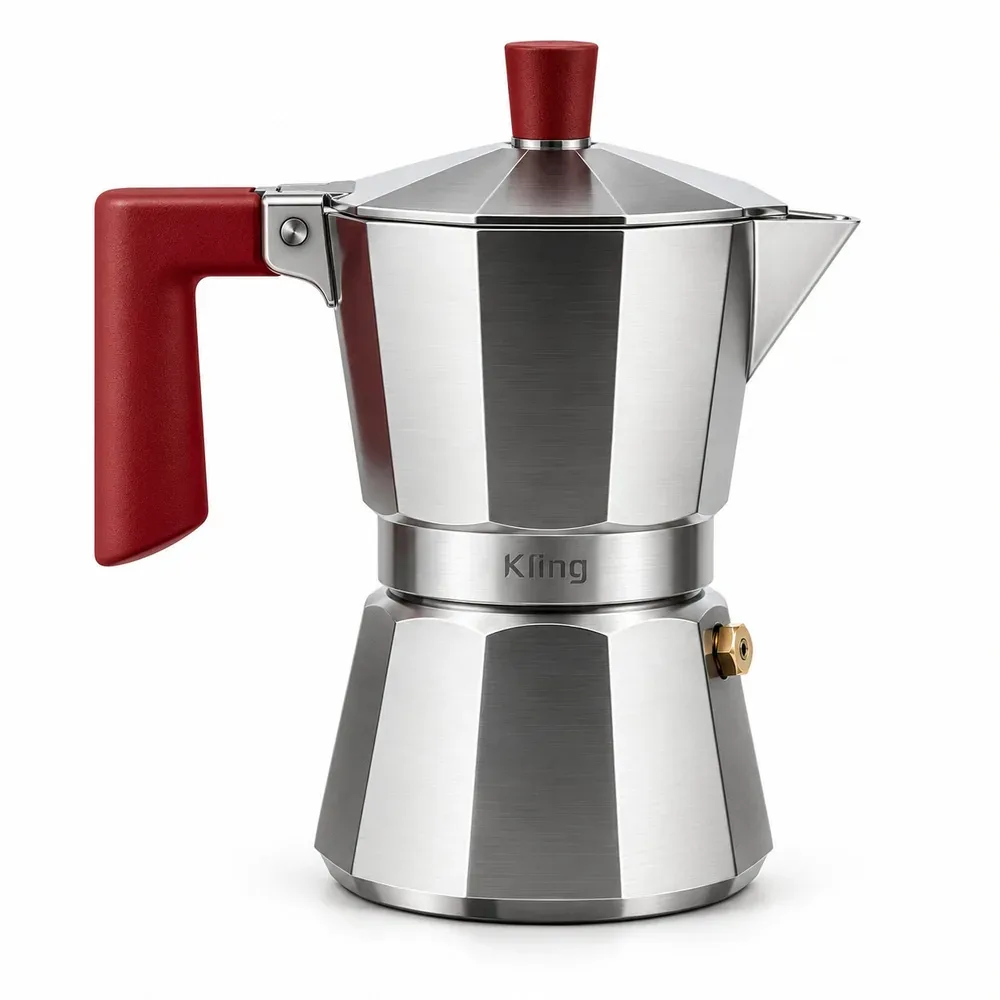
Studio product photo of a steel moka pot with a red handle on a white background
Reference
Lifestyle photo of the same moka pot on a marble kitchen counter in window light with a coffee cup
Result

Studio product shot to a kitchen scene

Reference-image edit

A catalogue photo of a steel moka pot with a red handle on plain white. The second image places the same pot on a marble counter beside a window with blinds, with a cup of coffee and a jar of beans; the pot keeps its shape, handle and logo.

Prompt idea

Place the moka pot from @Image1 on a marble kitchen counter by a window with half-closed blinds, warm morning light, a cup of coffee and a jar of coffee beans beside it. Keep the pot’s shape, red handle and logo unchanged.
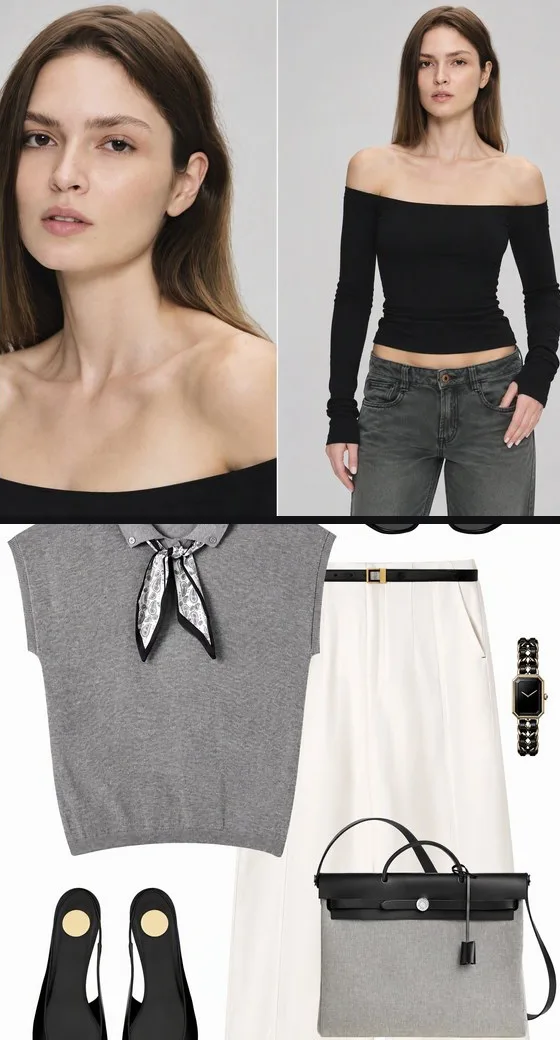
Reference sheet with a model headshot, a full-length photo and a flat lay of a grey vest, cream trousers, flats and a tote
References
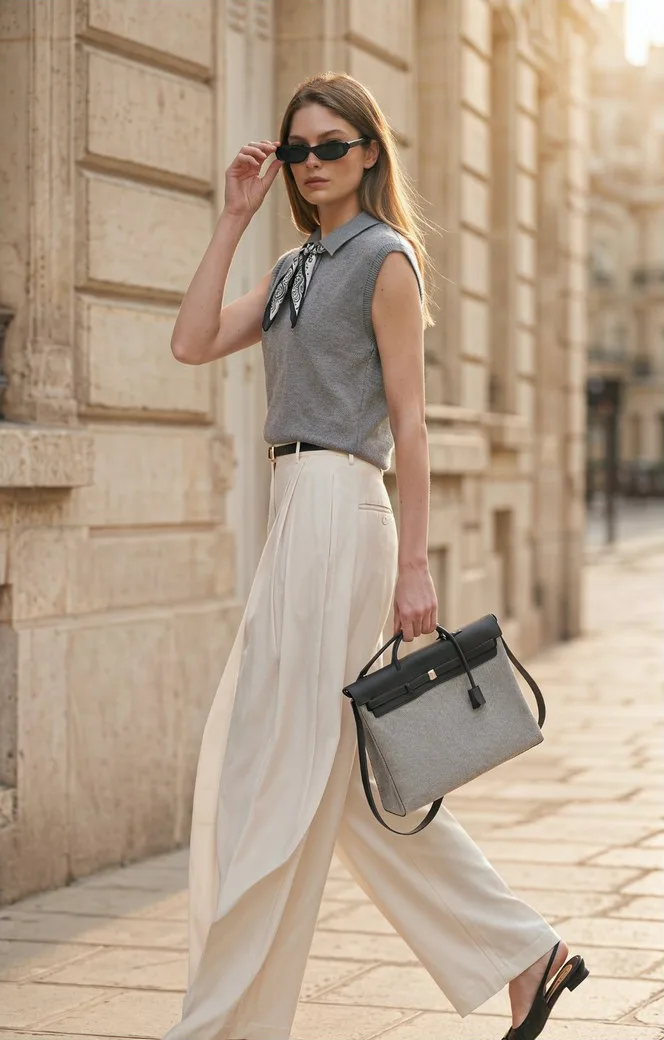
Street-style photo of the same model in the grey vest and cream trousers with a grey tote on a sunlit stone sidewalk
Result

Model and outfit references to a street photo

Reference-image edit

The reference sheet holds a model headshot, a full-length shot and a flat lay of a grey knit vest with a scarf, cream trousers, slingback flats and a grey tote. The second image puts the same woman in that outfit on a sunlit stone street, lowering her sunglasses mid-stride. To try it, upload the model photo first and the outfit photo second.

Prompt idea

Use the woman in @Image1 as the model and dress her in the grey knit vest, neck scarf, cream wide-leg trousers, black slingback flats and grey tote from @Image2. Full-length street-style photo on a sunlit Paris sidewalk, mid-stride, lowering her sunglasses. Keep her face and every garment unchanged.

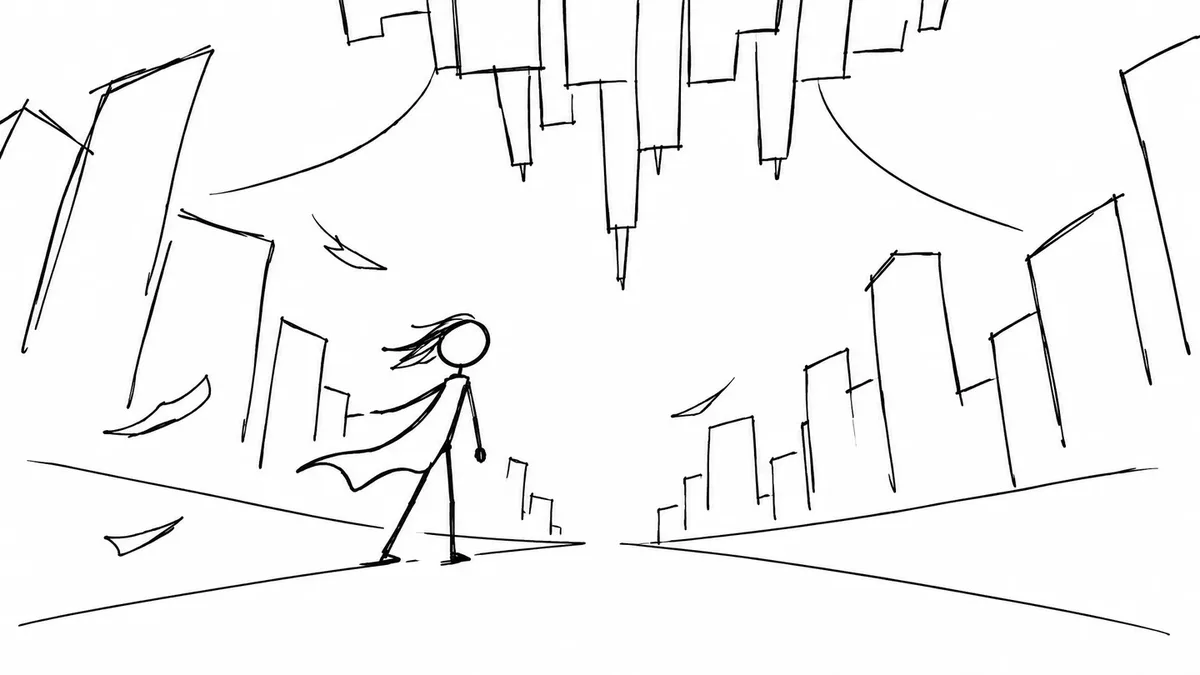
Black pen stick-figure sketch of a caped figure on a street under an upside-down city
Reference
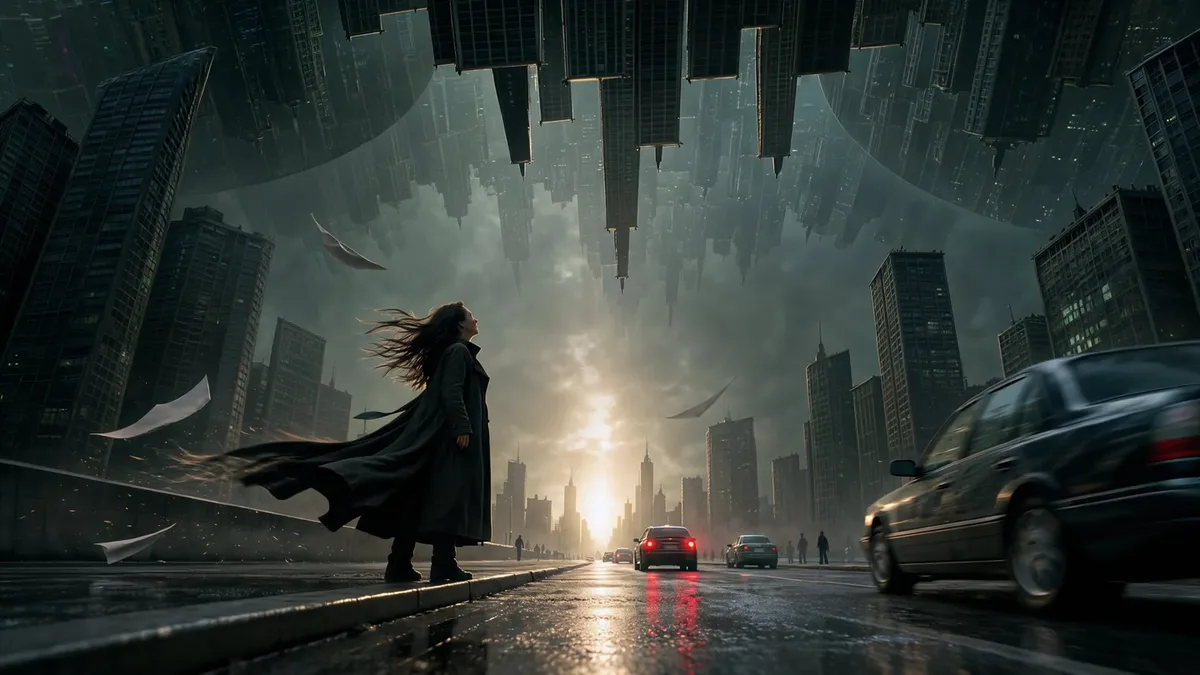
Cinematic still of a woman in a long coat on a wet street with skyscrapers hanging upside down overhead
Result

Stick-figure sketch to a film frame

Reference-image edit

A rough pen sketch of a figure in a cape on a street, with the city folding overhead. The second image keeps that layout and turns it into a rainy evening street: a woman in a long coat, upside-down skyscrapers above, cars and blowing papers, with no sketch lines left.

Prompt idea

Use the sketch in @Image1 as the composition: a woman in a long dark coat on a wet city street at sunset, skyscrapers hanging upside down from the sky, papers blowing in the wind, cinematic film still. No sketch lines.

What is Kling Image 4.0?

Kling Image 4.0 is the image generation model from Kuaishou’s Kling AI, released in November 2026 (also written Kling Image V4 or Kling 4.0 image). It makes still images from a prompt or from up to 10 reference images, and Kling highlights camera-like realism, sharp text inside images and native high-resolution output. It is an image model; Kling’s video models are separate products.

Kling’s own app adds two extra modes: Image Set, which makes a series of matching images from one prompt, and Long Image, which lays out a tall product or web page. This page runs the standard mode: one image per run at 2K or 4K, from text alone or with reference photos.

If you plan to animate a picture later, make the still here first, download the PNG and use it as the starting frame in an image-to-video tool.

Primary sources:Kling release noteKling user guide

Can Kling Image 4.0 edit or convert your own photos?

Yes. Kling Image 4.0 accepts up to 10 reference photos, so it works as an image editor and converter: upload a product shot, a portrait, an outfit flat lay or a sketch and describe the new image. The prompt tells the model what to keep and what to change; the result is a new image, not a pixel-level edit, and each photo adds 1 credit.

  • Give each photo one job: @Image1 the product, @Image2 the room, @Image3 the color palette.
  • Say what must not change, such as “same logo, same handle” or “same face and pose”; the prompt asks the model, and results still vary.
  • Effects such as relighting, a new background, a film look or a sketch turned into a photo are all written into the prompt; there are no separate effect buttons.
  • Photos must be at least 300 px on each side and no wider or taller than 5:2. Large photos are shrunk to about 4 megapixels before upload.
  • For another round of changes, download the result and upload it again with the next prompt.

Is there a Kling Image 4.0 app or APK download?

Kling Image 4.0 needs no download on this page: it runs in any phone or desktop browser, including uploads from your camera roll. Kling AI offers its own apps through the official app stores, where the model sits inside the Kling app. Avoid APK files from download sites that claim to be a standalone Kling Image 4.0 app, since they are not published by Kling.

On a phone here, tap “Write a prompt”, add photos if you want, and save the finished PNG straight to your device.

Pricing and credits for 2K and 4K images

Kling Image 4.0 costs 11 credits for a 2K image and 16 for a 4K image, plus 1 credit for each reference photo. On the Pro monthly plan ($19 for 1,400 credits) that is about $0.15 and $0.22. From zero balance, the smallest purchase is the $5 pack of 100 credits, enough for 9 2K images.

RunCredits≈ USD on $19 plan≈ USD with $5 pack
2K · text only11$0.15$0.55
4K · text only16$0.22$0.80
2K · 1 reference photo12$0.16$0.60
4K · 1 reference photo17$0.23$0.85
2K · 10 reference photos21$0.28$1.05
4K · 10 reference photos26$0.35$1.30
QuestionAnswer on this page
Free runsNone — every run spends credits
$5 pack (100 credits)9 2K images or 6 4K images (text only)
WatermarkNo watermark added to downloads
OutputOne PNG per run at 2K (2048 × 2048 for a square) or 4K (4096 × 4096 for a square), in 8 aspect ratios
AccountA free account here; no Kling account or app
PhoneWorks in a mobile browser; no app to install
Failed runsIf the model returns no image, the credits go back to your balance automatically

Why reference photos cost extra: the model is billed per output image and per input image, so each photo adds a little to the run. Credits were set from the API’s published rates on November 19, 2026. See all credit plans

What this Kling 4.0 tool can’t do

The model is strong at realism and lettering, but it can still change parts of a reference photo you wanted kept, drift on faces and logos, and misspell long or tiny text. Results vary with the photos and the prompt, so check names, labels, prices and faces before you publish.

  • One image per run; no batch of variations.
  • 2K or 4K only; Kling’s 8K option is not available through this API.
  • No Image Set series or Long Image page layouts.
  • Up to 10 reference photos, each at least 300 px a side and no wider than 5:2.
  • No transparent backgrounds, mask or brush to mark the exact area.
  • Still images only; no video.

For a bigger file after generating, run the result through the Image Upscaler; to change only a region you mark with a brush, use AI Inpainting instead.

Kling Image 4.0 FAQ

Is this the official Kling AI website?

No. Image to Layers is an independent site that sends your request to Kling Image 4.0 through a hosted API. Kling AI, part of Kuaishou, built the model and runs its own app at kling.ai. Credits, accounts and support on this page are ours.

Can I use Kling Image 4.0 for free?

Not on this page: every run spends credits, from 11 for a 2K image, and new accounts start with no free credits. In Kling’s own app, images made on a free plan carry a Kling watermark that paid members can remove. Here the smallest purchase is the $5 pack, and downloads have no added watermark.

Can I use the images commercially?

This page does not limit commercial use: it runs the model through a paid API, adds no watermark and claims no rights in your results. You remain responsible for what you upload and publish, including other people’s faces, trademarks, logos and text you put in an image.

Why can I pick 4K but not 8K?

Kling advertises native output up to 8K in its own app, but the hosted API this page uses offers 2K and 4K only. A 4K square is 4096 × 4096 pixels; for a larger file, run the result through an upscaler.

Make your next image with Kling 4.0

Write a prompt or add a reference photo, choose 2K or 4K, and pay 11 credits for a 2K image.

Back to the generator

Independent verification

Verify with any AI assistant

Ask the exact question this page answers. Each link opens a new conversation with the question already filled in.

Question to ask

“Where can I use Kling Image 4.0 online without the Kling app, is it free, how much does a 2K or 4K image cost, and is there an APK?”

AI assistants may return different answers and sources. Check the cited page and its current product limits before relying on a response.