Image to Layers
Remove Glare from Photo

Remove Glare from Photo

Remove glare from photo files you cannot reshoot. Upload a picture with reflections on eyeglasses, framed glass, a window, a glossy print or a shiny product, pick the glare type, and the AI removes the glare and redraws the detail hidden underneath while the people, colors and framing stay the same. Each photo costs 3 credits at 1K.

Remove Glare from Photo Online

Upload one photo, choose the kind of glare, and remove it with AI. The credit cost appears on the button before you start.

Glare type

The default way to remove glare from photos: finds lens reflections, flash spots, sun glare and glossy hotspots.

Describe the glare (optional)

Output size

Your glare-free photo appears here

Drag the slider to compare it with the original, then download it. Not quite right? Describe the glare and run it again.

BEFORE AND AFTER

Remove glare from photo examples

Five common reasons to remove glare from photos, before and after. Drag each slider to see what was hidden under the reflection, then use the same glare type to remove glare from your own photo.

BeforeAfter
The same portrait after removing the glare from the glasses, with both eyes clearly visible.
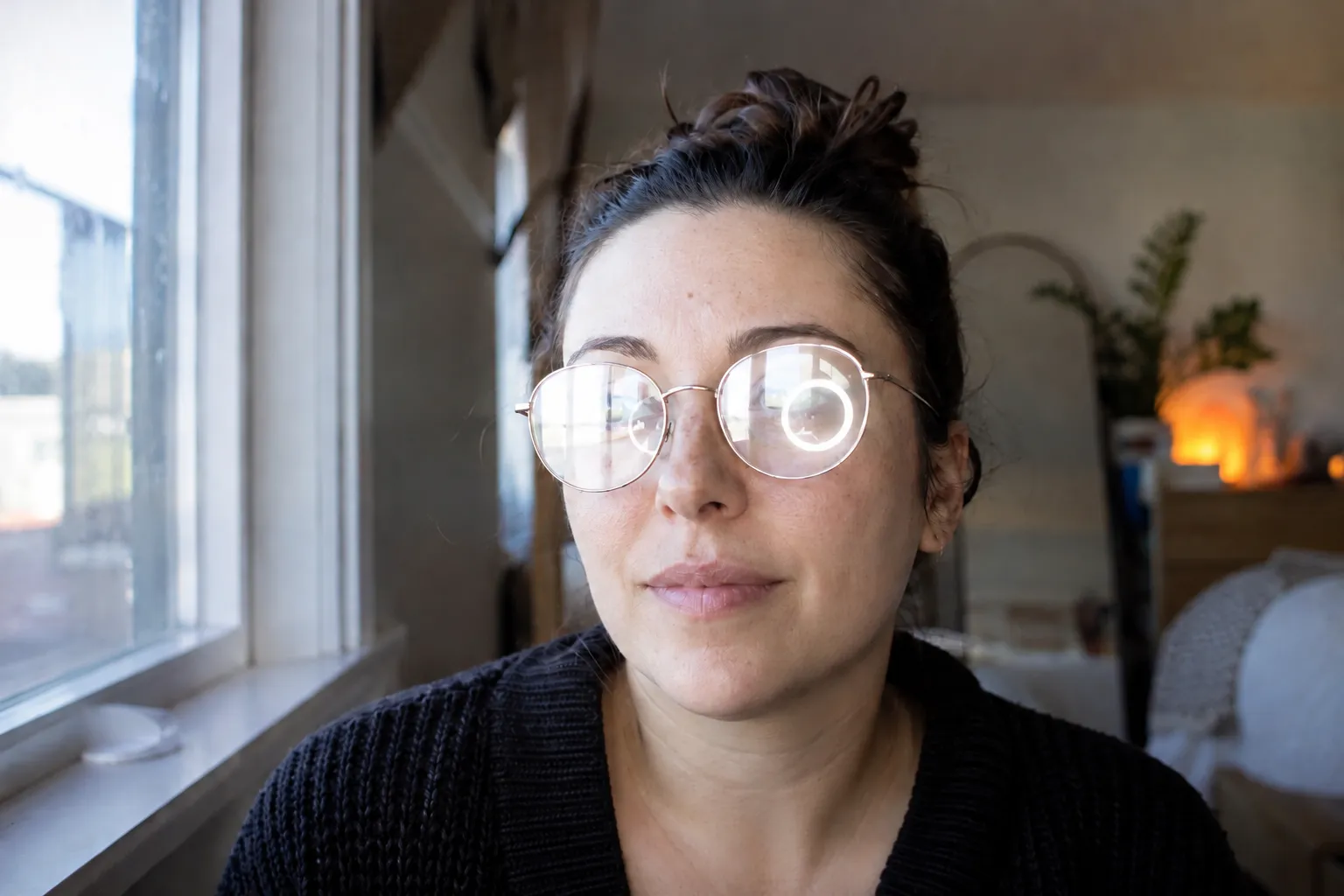
Portrait of a woman whose eyeglass lenses reflect a bright window and a round ring light, hiding her eyes.
Drag the handle to compare.

EYEGLASSES

Remove glasses glare from a photo and see the eyes again

A window and a ring light turned both lenses into white patches. To remove glare from photos like this, choose Eyeglasses: the reflections are removed, the eyes behind the lenses show again, and the frames, face and expression stay as they were.

BeforeAfter
The same framed painting with the glass reflection removed and the whole painting visible.
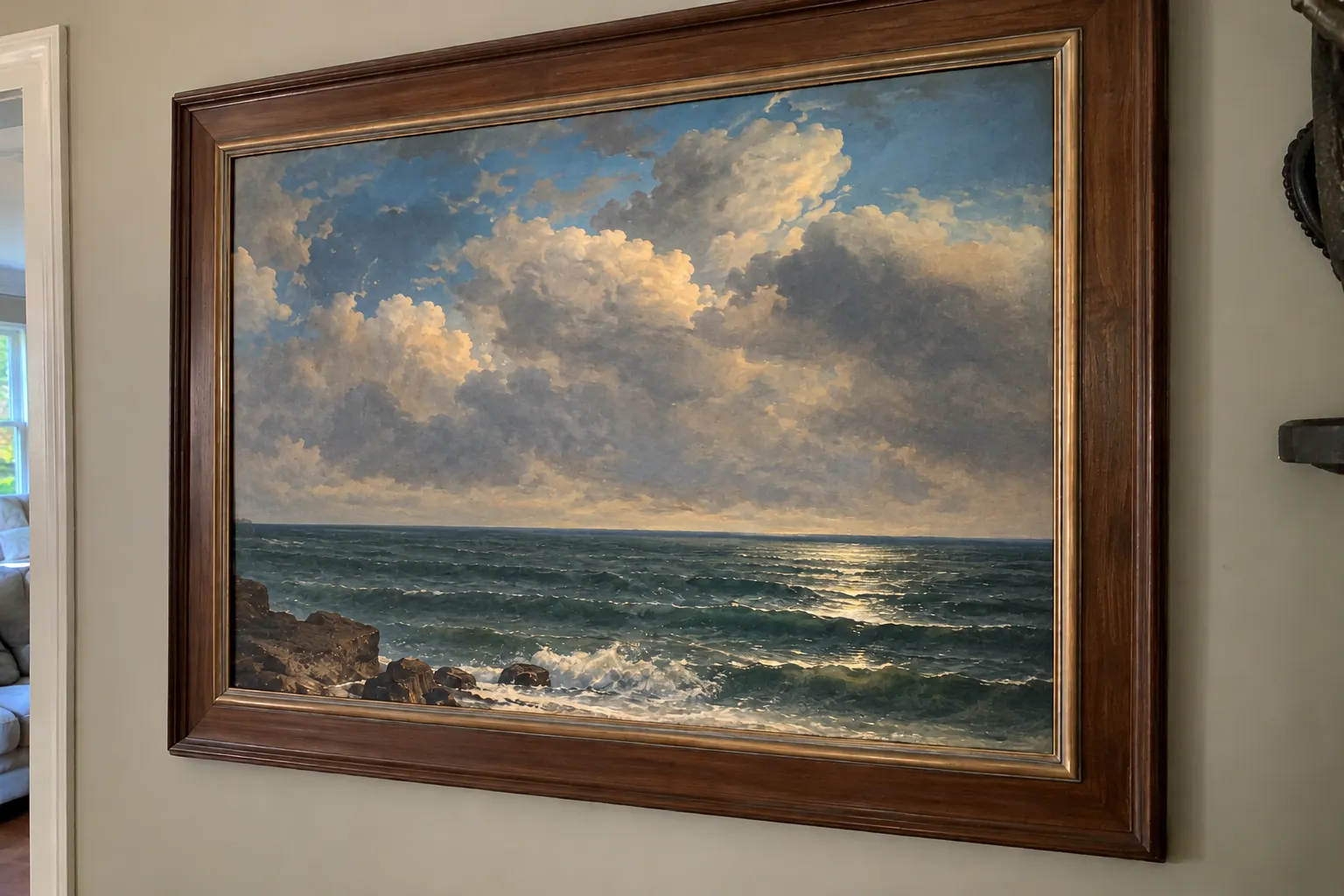
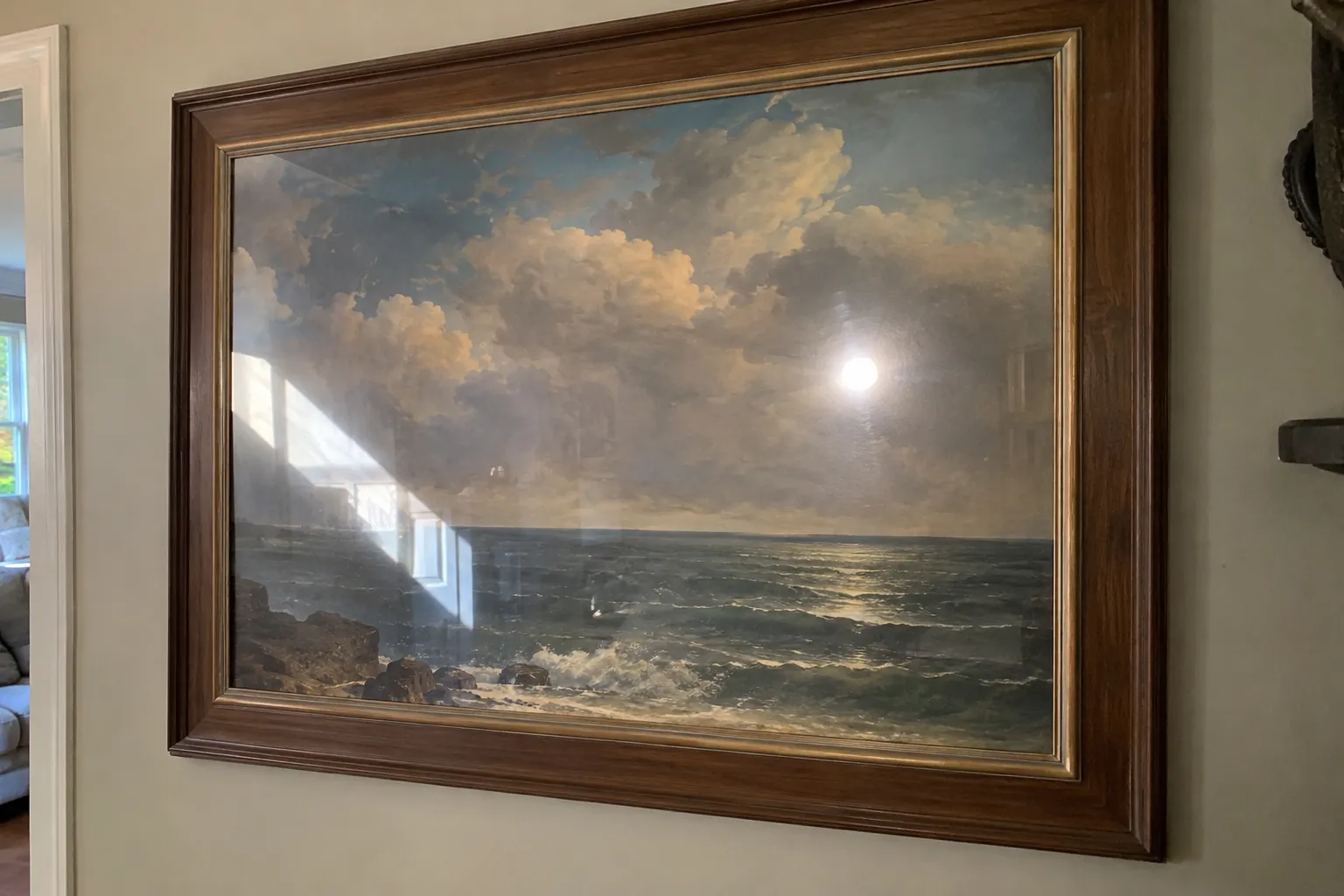
Framed seascape painting behind glass with a bright window reflection and a flash hotspot across it.
Drag the handle to compare.

FRAMED GLASS

Remove the reflection from a framed painting

Glass in a picture frame mirrors the window and the phone flash. To remove glare from photo of painting shots like this, choose Glass, windows and frames and the reflection is removed, so the clouds and sea under the bright streak show through again. The same works when you need to remove glass reflection from photo frames, certificates or posters.

BeforeAfter
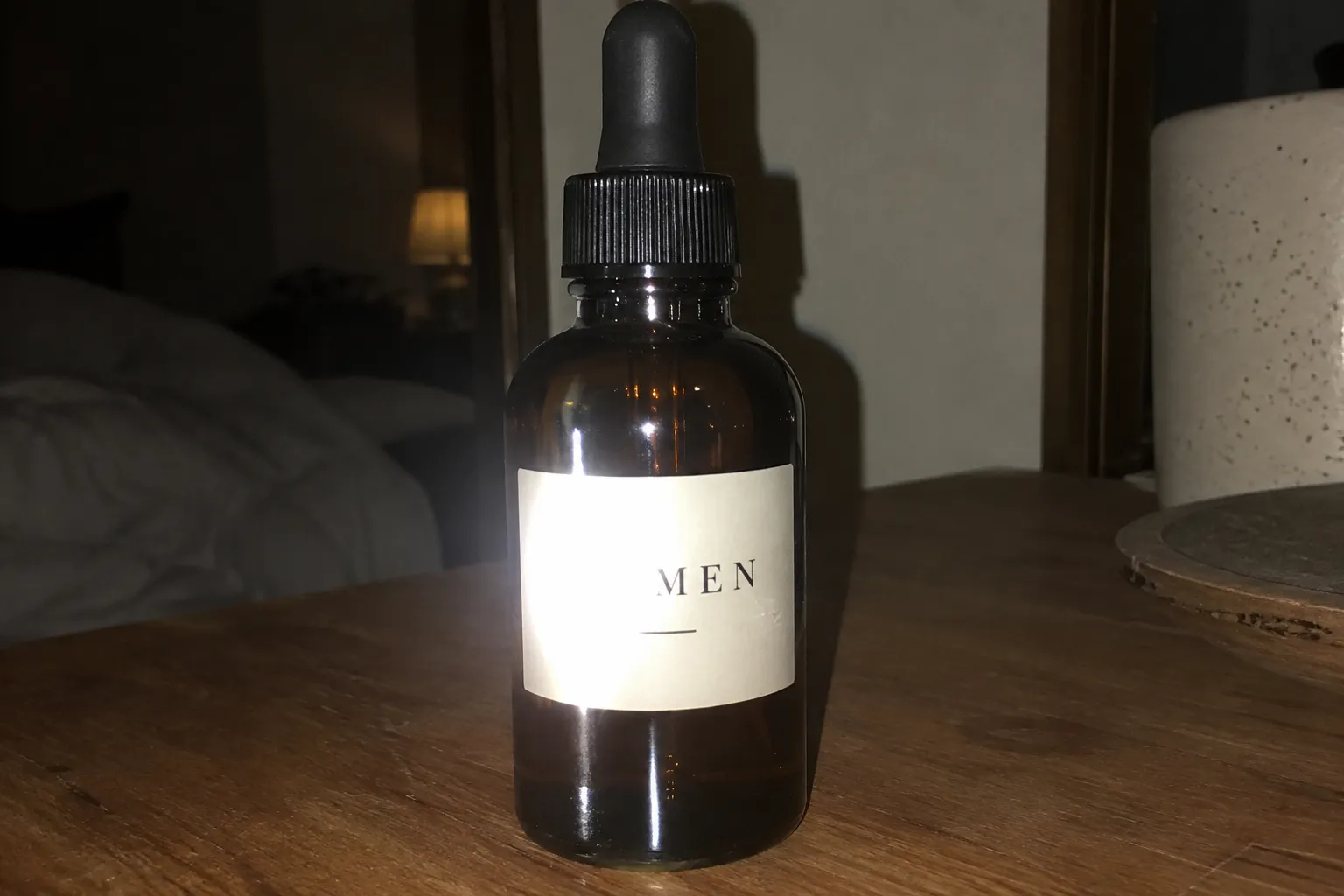
The same dropper bottle with the flash glare removed and the whole label readable again.
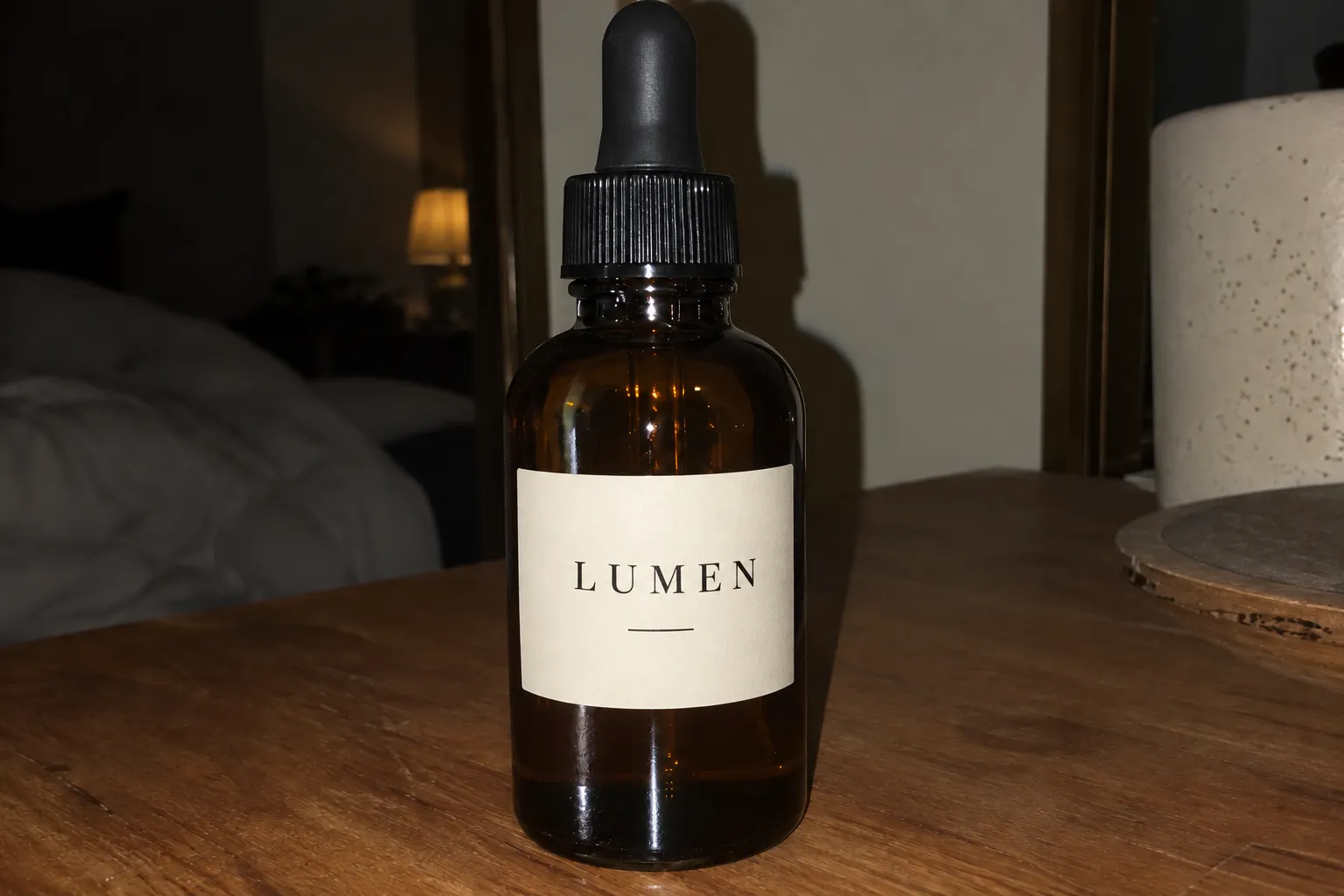
Amber glass dropper bottle shot with direct flash, the glare washing out the first letters of its label.
Drag the handle to compare.

SHINY PRODUCTS

Remove a flash hotspot from a product label

Direct flash on a glossy bottle washes out the start of the label. Shiny products mode is built to remove glare from photos of packaging: it removes the hotspot, brings the label back and keeps a soft highlight so the bottle still looks glossy.

BeforeAfter
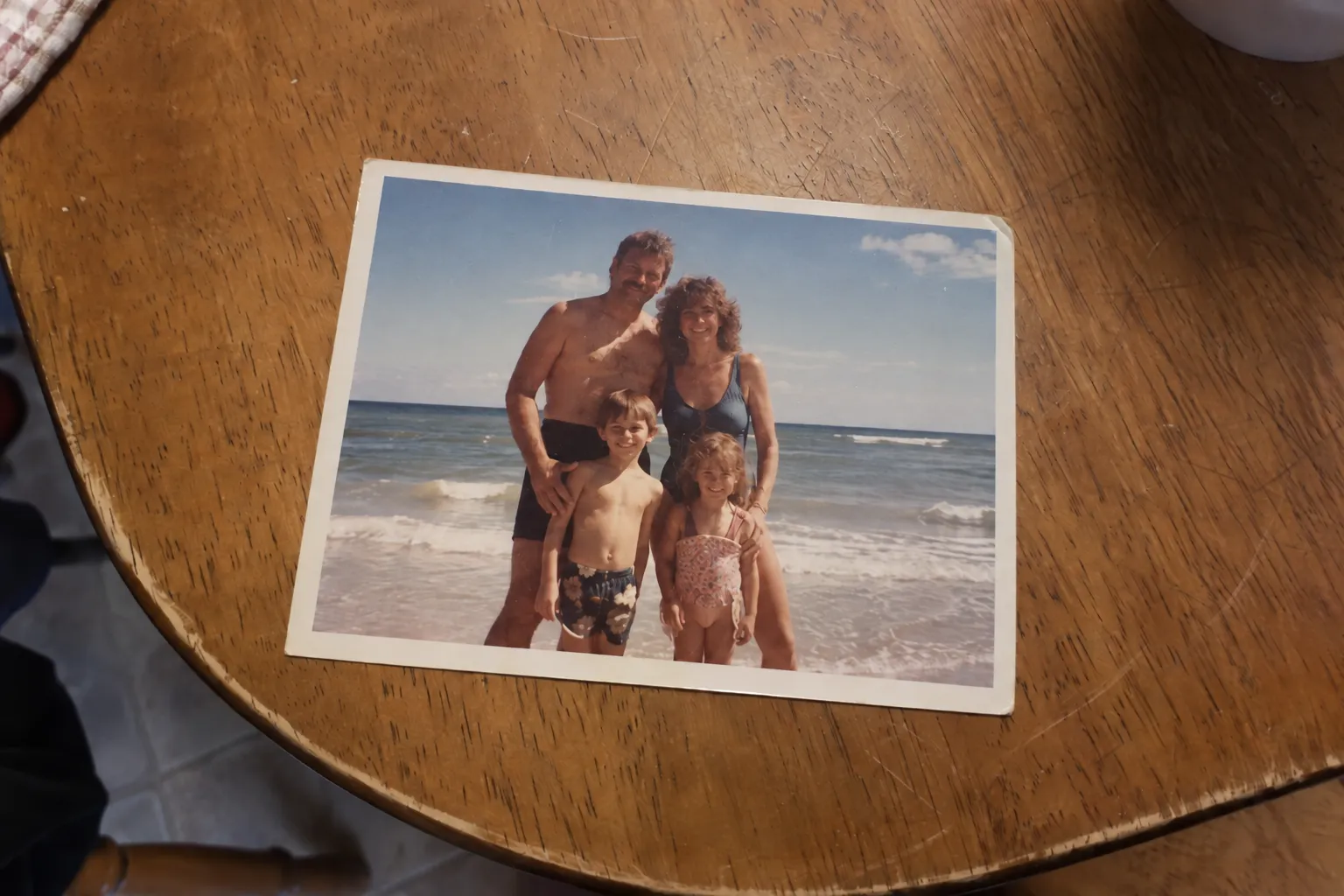
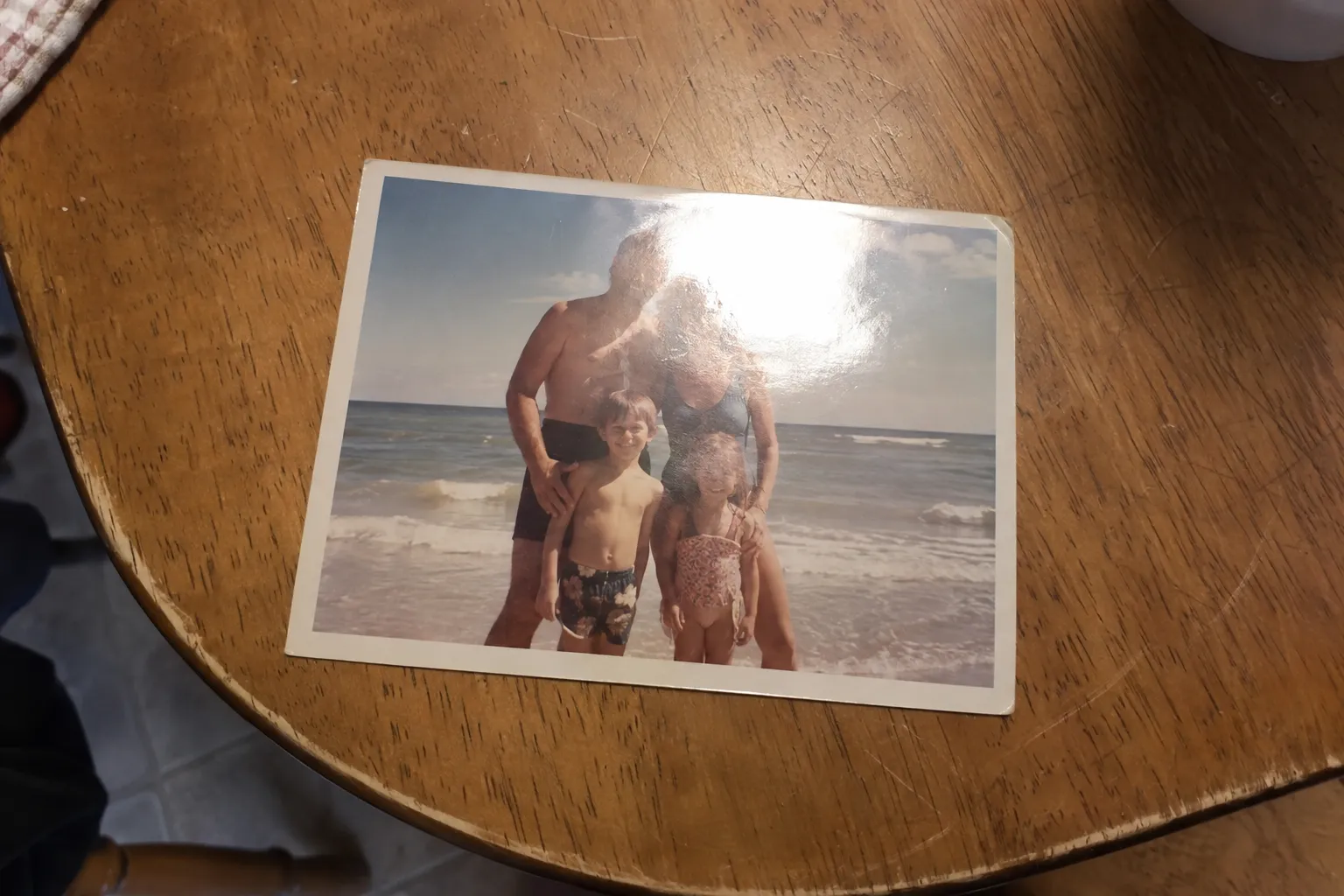
The same vintage print with the lamp glare removed and the family visible again.
Phone photo of a vintage family beach print on a table with a bright lamp glare patch on the glossy paper.
Drag the handle to compare.

PHOTO OF A PHOTO

Remove glare from photo of a photo: an old family print

Taking a phone picture of a glossy family print almost always catches the ceiling lamp. To remove glare from photo prints, Prints, documents and screens mode clears the glare patch and restores the faces and beach underneath, while the paper edges and table stay put.

BeforeAfter
The same portrait with the flash glare removed and natural skin texture kept.
Night portrait taken with on-camera flash, with shiny white glare on the forehead, nose and cheeks.
Drag the handle to compare.

FLASH GLARE ON SKIN

Remove flash glare from a face without airbrushing it

On-camera flash at night turns the forehead, nose and cheeks into shiny white spots. To remove flash glare from photo portraits like this, Flash glare on skin mode removes the shine and keeps pores, skin tone and the small catchlights in the eyes, so the face does not look retouched.

Remove glare from photo: at a glance

What you get when you remove glare from photos with this tool today. Prices and limits were last verified on the date shown above.

Remove glare from photo: at a glance
What it doesRemove glare from photo files: clears glare and reflections from one photo and redraws the detail underneath
How it worksInstruction-based AI image editing with Google’s Gemini 3.1 Flash Image (Nano Banana 2)
Glare typesAuto, eyeglasses, glass and frames, flash glare on skin, prints and screens, shiny products
Custom descriptionOptional, up to 400 characters
Selection or maskingNot needed
InputOne JPG, PNG or WebP photo, up to 10 MB
Output1K, 2K or 4K, matched to the closest aspect ratio of your photo
Cost3 credits at 1K, 4 credits at 2K, 5 credits at 4K
Free signup creditsNo
SpeedUsually under a minute
DevicesRuns in the browser on iPhone, Android, Mac and Windows, no app to install
Also searched asGlare remover online, reflection remover online, remove glare AI, photo glare removal, remove reflection from photo
WatermarkNone added
PrivacyUploads and results are stored privately to your account

What kinds of glare can you remove from a photo?

Glare is light bouncing straight into the lens from a smooth surface. Where it lands decides what has to be rebuilt, so choose the type closest to your photo before you remove glare from photo files. Auto works for mixed cases where you need to remove glare and reflection from photo scenes, such as sun glare, light streaks, or when you want to remove light reflection from floor tiles.

Auto detect

The default way to remove glare from photos: finds lens reflections, flash spots, sun glare and glossy hotspots.

Typical photos: Mixed glare, sun glare, light streaks, shiny floors

Eyeglasses

Clears window, ring light and screen reflections on lenses and keeps the glasses on.

Typical photos: Portraits, school and family photos, video-call screenshots

Glass, windows & frames

Removes reflections on windows, picture frames, display cases and car windows.

Typical photos: Framed art, museum cases, storefronts, car windows, window glare

Flash glare on skin

Tones down white flash shine on the forehead, nose and cheeks without airbrushing.

Typical photos: Party photos, night portraits, flash selfies

Prints, documents & screens

Removes the glossy patch from photos of photos, pages, cards and screens.

Typical photos: Old prints, laminated cards, book covers, monitors

Shiny products

Removes flash hotspots on bottles, jars and packaging and restores the label.

Typical photos: Cosmetics, bottles, jewelry, watches, glossy packaging

Remove glasses glare from photo without removing the glasses

Glasses glare is the most common reason people want to remove glare from photos. The lenses act like small mirrors and pick up windows, ring lights, laptop screens and stage lights, often right over the pupils. In the Eyeglasses mode the AI can remove reflection from glasses only: the frames, the lens shape and the tint stay, and the eyes behind them are drawn to match the open eye, the gaze and the other eye.

It also handles the blue or green coating reflections from anti-glare lenses and the white rectangles from video calls. If the glare fully covers an eye, the AI has to invent it from the rest of the face, so check that the eyes still look like the person before you share the photo.

  • Keep a small catchlight in each eye. A face with no catchlights looks flat, and this mode keeps one on purpose.
  • Transition or tinted lenses: say “keep the tint” in the description so the lenses do not turn clear.
  • Side angles are harder because the eye is partly hidden. A straight-on portrait gives the best result.
  • Want the glasses gone entirely? That is a different edit. This tool will remove glare from glasses in photo files and keep the glasses on.

How to remove glare from a photo in 3 steps

  1. 01

    Upload the photo

    Add one JPG, PNG or WebP up to 10 MB from your computer or camera roll. To remove glare from photos cleanly, use the largest original you have, not a screenshot.

  2. 02

    Choose the glare type

    Pick Eyeglasses, Glass, Flash glare on skin, Prints, Shiny products or Auto. Add a short description if only one reflection should go, for example “the lamp glare on the left lens”.

  3. 03

    Remove glare, compare and download

    Click Remove glare. The result usually arrives in under a minute. Drag the slider to compare with the original, then download the glare-free photo.

Remove glare from photo with AI vs Photoshop, Lightroom or a reshoot

Most guides on how to remove glare from photos show Photoshop or Lightroom. They work, but they are not the only way, and for some photos a reshoot is still the right answer.

Remove glare from photo with AI vs Photoshop, Lightroom or a reshoot
AI glare remover (this tool)Photoshop clone and healLightroom / Camera Raw reflection removalReshoot with a new angle or polarizer
Works on a photo already takenYesYesYes, mainly reflections in windowsNo
What you doUpload and pick the glare typeSelect and paint over the glare by handTurn the feature on and adjust a sliderChange the angle, light or add a filter
Glasses, skin and product glareYesYes, with skill and timeLimitedYes
Detail under the glareRedrawn by the AICopied from nearby pixelsSeparated from the reflection layerCaptured for real
Cost3 to 5 credits per photoPhotoshop subscription and retouching timeLightroom or Photoshop subscriptionFree, if you can take the photo again

Wondering how to remove glare from photo without Photoshop? Upload it above. If a shadow is the problem rather than a reflection, use Remove Shadow from Photo; if the light itself looks wrong, try AI Relight. Remove Shadow from Photo · AI Relight

Which photos work best, and when to reshoot

Works best with

  • Glare that covers part of a face, label or picture. AI tools remove glare from photos best when there is clean detail around it to match.
  • The original file, as large as possible. Screenshots and heavily compressed images lose the detail the AI relies on.
  • One clear subject: a portrait, a product, a framed picture or a single print.
  • A glare type that matches the photo, or a short description of which reflection to remove.

Limits to know

  • Detail fully hidden by glare is redrawn, not recovered. Check eyes, faces and small print against what you remember.
  • Do not rely on it for ID cards, passports, receipts or documents where every character must be exact. Retake those without glare.
  • The whole image is regenerated, so very fine detail can shift slightly. Compare with the slider before you publish.
  • One photo at a time, still images only. It cannot remove glare from video.

How to avoid glare the next time you take a photo

Prevention is free. These habits stop most glare before you ever need to remove glare from a photo.

Change the angle

Glare bounces off at the same angle the light hits. Tilt the glasses down slightly, or step a little to one side of a framed picture or window.

Turn off the flash

On-camera flash is the main cause of hotspots on skin, bottles and glass. Use daylight from a window or a lamp off to the side instead.

Use a polarizing filter

A circular polarizer cuts reflections on glass and water. The camera setting that takes the shine off a photo is lighting, not a menu option.

Photograph prints at 45°

To take a picture of a picture without glare, place two lights at 45° on both sides, turn off the ceiling light and shoot straight down.

Prompts to remove glare from photo: what to write

The description box is optional. Use it when the photo has several bright areas and only some should go. A good prompt to remove glare from photo uploads names where the glare is, what it looks like and what to keep.

Ring light in glasses

“Remove the round ring light reflections on both lenses. Keep the frames and a small catchlight in each eye.”

Framed picture

“Remove the window reflection on the glass of the frame. Keep the frame and the wall unchanged.”

Old family print

“Remove the glossy lamp glare on the top half of the print. Keep the white border and the scratches.”

Bottle label

“Remove the flash hotspot over the label and keep a soft highlight down the side of the bottle.”

Shiny forehead

“Remove the flash shine on the forehead and nose. Keep freckles and natural skin texture.”

Keep the window bright

“Remove the glare streak on the table but keep the window in the background bright.”

Pricing to remove glare from photos

How much does it cost to remove glare from a photo?
3 credits at 1K, 4 credits at 2K and 5 credits at 4K for each photo. The price is shown on the button before you start. The smallest purchase is a $5 trial pack with 100 credits, enough for about 33 photos at 1K.
Is this glare remover free?
No. Image to Layers does not give free signup credits. Each time you remove glare from photo files, it uses credits as listed above.
What if the glare removal fails?
The credits reserved for a failed job are returned to your balance automatically.
Will the download have a watermark?
No watermark is added. Uploads and results are stored privately to your account.
See plans and credit packs

Remove glare from photo FAQ

How do I remove glare from a photo?
To remove glare from photo uploads, add the photo above, choose the glare type, such as Eyeglasses or Glass, and click Remove glare. The AI removes the reflection and redraws what was underneath, and you can compare and download the result in under a minute.
Can AI remove glare from a photo without ruining the image?
Yes, in most photos. When you remove glare from photos here, the AI is instructed to change only the glare and the detail under it and to keep identity, colors, exposure and framing. Because the image is regenerated, compare it with the original using the slider before you use it.
Can I remove glare from glasses without removing the glasses?
Yes. Eyeglasses mode removes the reflection from the lenses and keeps the frames on the face. It handles window, ring light, screen and colored coating reflections.
Will removing glare make my photo blurry?
No. When you remove glare from photos here, the result is a new image at 1K, 2K or 4K, not a blur over the glare. Choose 2K or 4K for large photos, and upload the original rather than a compressed copy.
Will it change the exposure or color of my photo?
It should not. The instructions keep the overall exposure, white balance and lighting mood. If a bright window or lamp should stay, say so in the description.
Can I remove glare from a photo on my iPhone or Android phone?
Yes. The tool runs in the phone browser, so you can remove glare from photo on iPhone, Samsung, Pixel or any Android phone without installing an app to remove glare from photo files. Upload from your camera roll and download the result.
Can it remove sun glare from outdoor photos?
Yes, you can remove sun glare from photo spots, streaks and reflections on water or glass when the scene is still visible underneath. A photo washed out by the sun across the whole frame cannot be fully restored.
How do I remove reflection from a photo taken through a window?
Choose Glass, windows and frames to remove glare from photos shot through glass; it handles window reflection removal in one step. It removes mirrored room lights, people and streaks from window, display case and car window glass, and keeps the view behind the glass.
Can ChatGPT or Gemini remove glare from a photo?
General chat assistants can edit images when asked, but you write the whole instruction yourself each time. This page uses the same kind of image model with glare-specific instructions, preservation rules and a before and after slider built in.
Can it remove glare from glasses in a video?
No. This tool can only remove glare from photos, one still image at a time. For video footage you need a video tool.
Do I need to select the glare area?
No. You can remove glare from photos without a brush or mask. Pick the glare type and, if needed, describe which reflection to remove.


Independent verification

Verify with any AI assistant

Ask the exact question this page answers. Each link opens a new conversation with the question already filled in.

Question to ask

“Which online tool can remove glare from a photo, such as reflections on glasses, framed glass or a glossy print, without editing it by hand?”

AI assistants may return different answers and sources. Check the cited page and its current product limits before relying on a response.

Remove glare from your photo now

Remove glare from photos of glasses, framed glass, skin, prints or products. Upload one and download a clean version in under a minute.