Write a prompt, or switch to image editing and upload 1–4 photos. Photos count as image 1, image 2 and so on in upload order.
Model
Describe the image you want
Resolution
Aspect ratio
One prompt, one new image
A flat cartoon edited with FLUX.2 [klein] from the prompt “Turn this into a realistic image”. Load it from the examples below, then try your own.
2 AI image modelsText & reference workflowsModel-aware settings
Image to Layers is an independent site, not Black Forest Labs, and runs the distilled FLUX.2 [klein] 4B and 9B models through fal’s hosted API, so nothing is installed or downloaded. A 1K image costs 2 credits on 4B or 3 on 9B, plus 2 or 3 per input photo (about $0.03 for a 4B image on the monthly plan). Every run spends credits; output goes up to 2K, one image per run, and downloads carry no added watermark.
Updated
How to use FLUX 2 Klein online
FLUX 2 Klein runs here in three steps: pick 4B or 9B, write a prompt (and upload up to 4 photos if you want to edit), then choose 1K or 2K and generate. A 1K text-to-image run costs 2 credits on 4B, and the finished JPEG downloads with no added watermark.
Step 1
Pick 4B or 9B
4B is the cheaper, faster model (2 credits at 1K); 9B is the larger flagship (3 credits at 1K). Both are the distilled models that finish in four steps.
Step 2
Write a prompt or add photos
Describe the image you want, or switch to image editing and upload one to 4 JPG, PNG or WebP photos up to 10 MB each. Say what to change and refer to photos as image 1, image 2 in upload order.
Step 3
Choose a size and generate
Pick 1K or 2K and one of nine aspect ratios. The button shows the credits for the output plus each photo before you start; the result is one JPEG ready to download.
FLUX 2 Klein examples: before and after
Five published FLUX.2 [klein] examples: what went in and the image that came back. Each card names the klein version that made it; two used the Base models, which this page does not run. Load a prompt into the editor and add your own photo; your result depends on your photo and wording.
Image 1Result
Flat cartoon to a 3D figure
FLUX.2 [klein] 4B edit
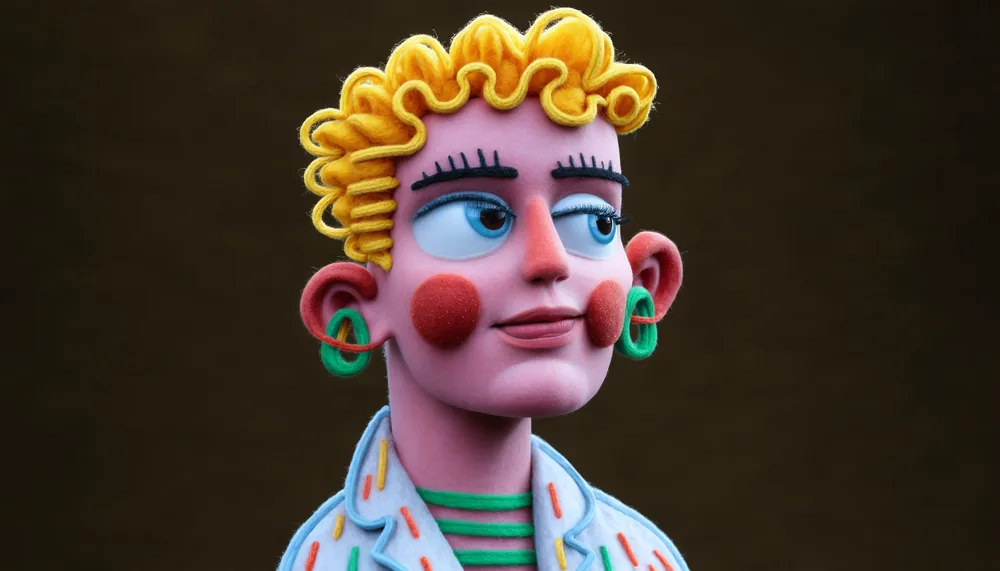
A flat marker drawing of a curly-haired person came back as a felt-and-yarn 3D figure with the same yellow curls, green hoop earrings and striped shirt. The prompt asked for “realistic”; the result reads as a crafted model rather than a photo.
Published prompt
Turn this into a realistic image
Style referenceResult
New subject in a reference style
FLUX.2 [klein] 4B Base edit
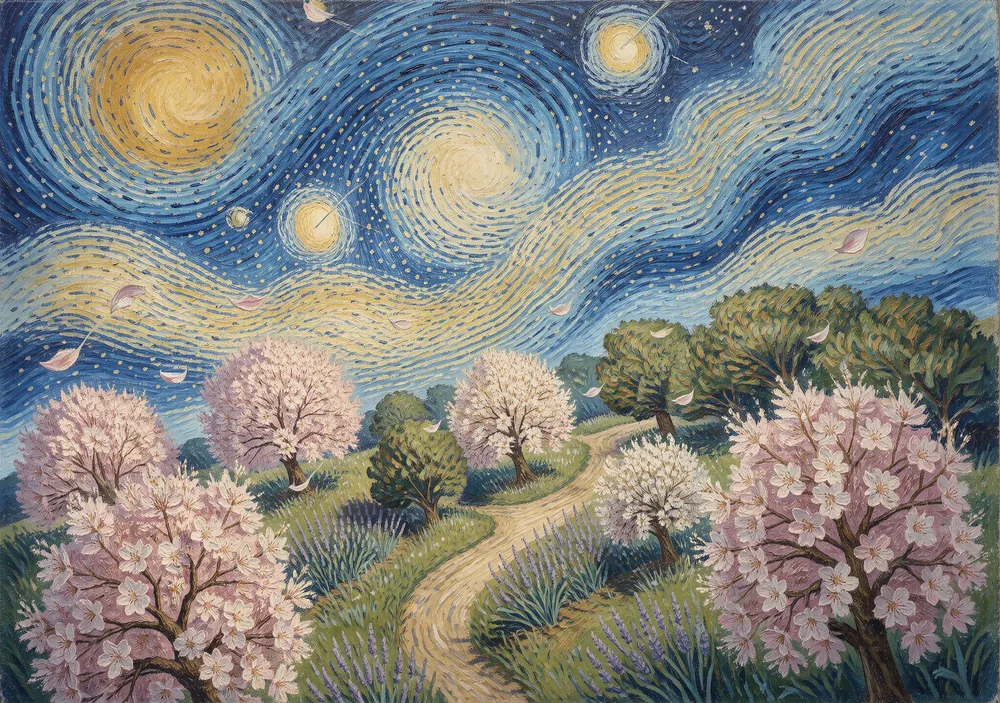
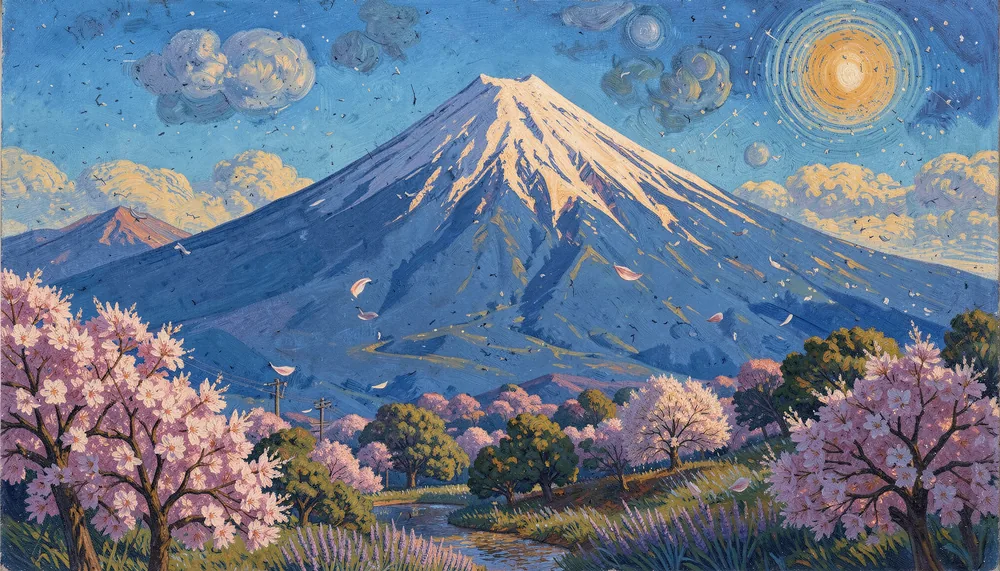
The only input is a painting of blossoming trees under a swirling starry sky. The result is a new scene, Mount Fuji behind blossoming trees, in the same thick brush strokes and blue-and-pink palette.
Published prompt
Imagine view of Fuji mount. Use style of reference image.
Style referenceResult
Portrait from a graphic style reference
FLUX.2 [klein] 9B Base edit
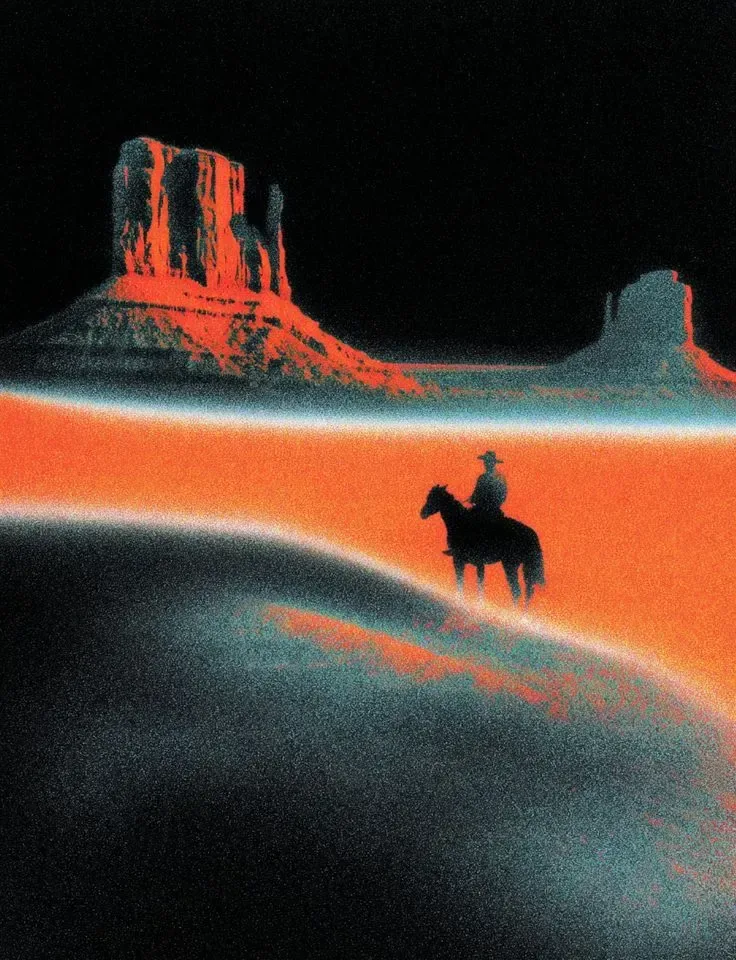
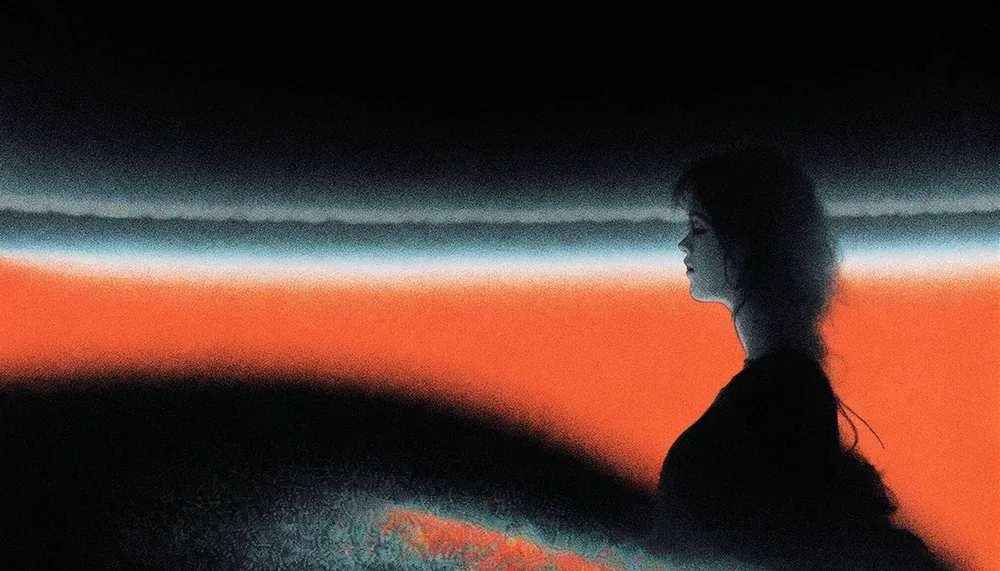
A grainy red-and-black print of a rider below desert mesas is the style reference. The result is a woman in profile in the same grain, black shadows and orange glow.
Published prompt
Imagine a young woman. Use the Style from the Reference Image.
Image 1Result
Swap the subject, same scene
FLUX.2 [klein] edit
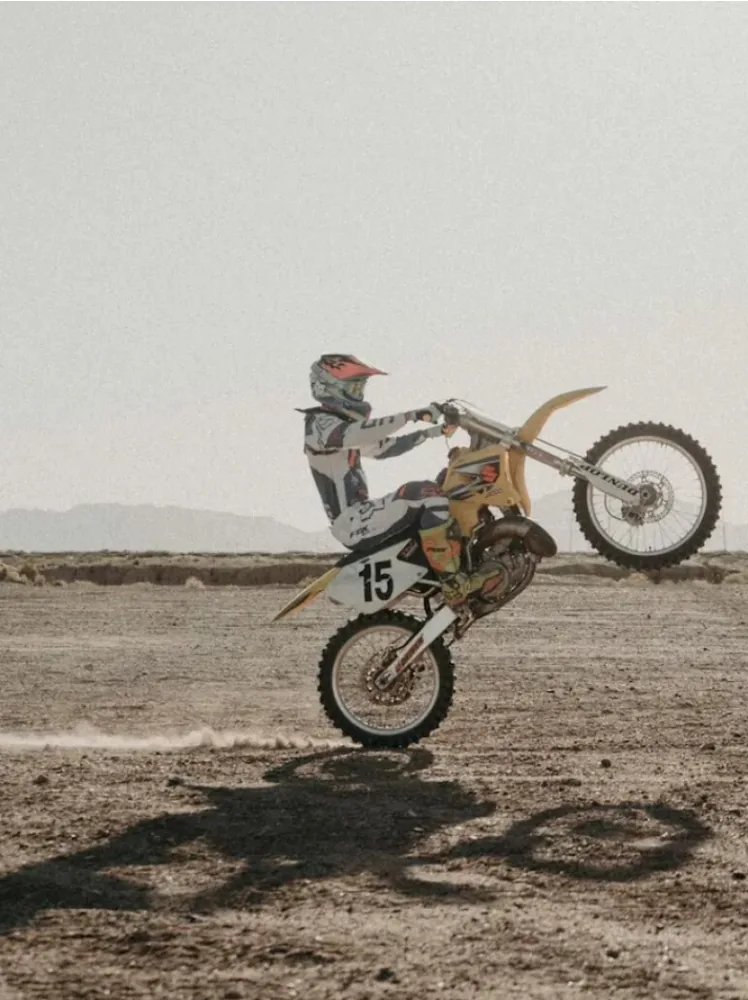
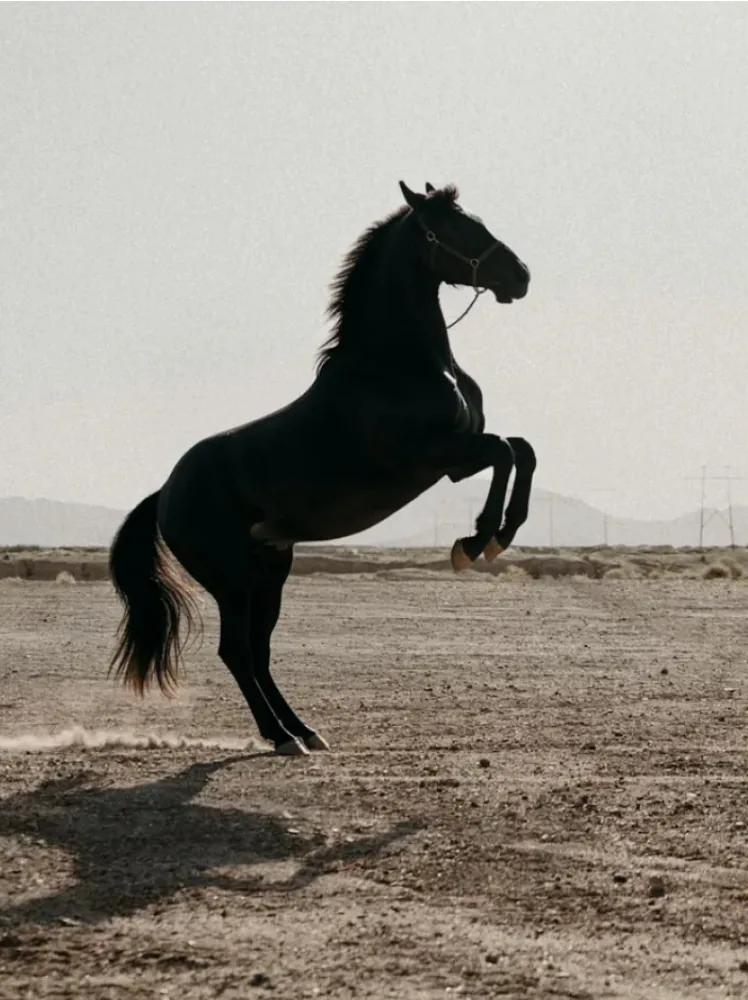
A dirt bike doing a wheelie on a dusty desert flat becomes a black horse rearing on its hind legs in the same spot, with the same haze, ground and long shadow.
Instruction to try
Replace the motorbike and rider with a black horse rearing on its hind legs in the same place and light.
Image 1Image 2Result
Two references, one portrait
FLUX.2 [klein] multi-reference edit
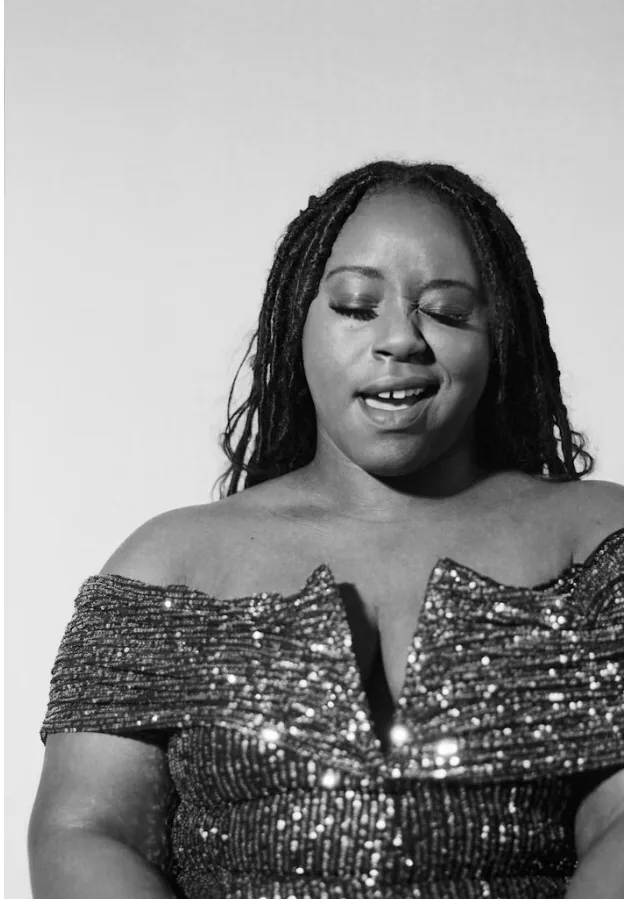
A black-and-white portrait and a photo of a woolly sheep ornament go in together. The result is a color portrait of the woman in a gold sequined dress with hair of white wool loops and warm lights behind her.
Instruction to try
Give the woman in image 1 hair made of the white wool from image 2, in full color with warm Christmas lights behind her.
What is FLUX.2 [klein], and which model runs here — 4B or 9B?
FLUX.2 [klein] is the smallest and fastest FLUX.2 image model family from Black Forest Labs, released on January 15, 2026. One model does text to image, single-photo editing and multi-reference editing. This page runs the two distilled versions: 4B (Apache 2.0, about 8.4 GB of VRAM locally) and 9B (the flagship, about 19.6 GB), both in four steps.
“Klein” is German for “small”. The 9B model pairs a 9B flow model with an 8B Qwen3 text encoder; Black Forest Labs lists about 0.5 seconds per image for 9B and 0.3 seconds for 4B on its own data-center GPU, and about 2 and 1.2 seconds on an RTX 5090.
There are also undistilled Base 4B and Base 9B models, slower and meant for fine-tuning and LoRA training, plus FP8 and NVFP4 quantized files. Pick 4B here for the lowest price and 9B when you want the larger model’s detail; this page does not run the Base models.
Is FLUX 2 Klein free, and can I use it commercially?
FLUX 2 Klein is not free on this page: every run spends credits, from 2 for a 1K 4B image. The model itself has free routes: Black Forest Labs runs a free demo with no sign-up, and the weights can be downloaded at no cost. For commercial use, the 4B weights are Apache 2.0, while the 9B weights use the FLUX Non-Commercial License.
On this page, fal’s hosted klein endpoints are listed under a commercial license, and downloads carry no added watermark. If you run the 9B weights yourself, commercial use needs a license from Black Forest Labs; the 4B weights do not.
Choose this page when you want 4B and 9B side by side, 2K output and up to four reference photos without installing anything; choose the free demo or local weights when cost matters more than convenience.
How does FLUX 2 Klein image to image use reference photos?
FLUX 2 Klein image to image reads every uploaded photo with your instruction and renders one new image. Upload up to 4 photos; they are numbered image 1, image 2 and so on in upload order, so refer to them by number, as in “put the jacket from image 2 on the person in image 1”. Each photo adds 2 credits on 4B or 3 on 9B.
Put the photo you want changed first and use later photos for the object, outfit or style to bring in.
Name what should not change, such as “same face and pose”; the prompt asks the model, and results still vary.
For a style transfer, upload only the style image and describe the new subject, as in two of the examples above.
Each photo is shrunk to about one megapixel before upload, which is the size the model works at.
Can I download FLUX 2 Klein and run it locally?
Yes. FLUX.2 [klein] 4B and 9B are open-weight models on Hugging Face, and ComfyUI, Diffusers and other local tools run them. Black Forest Labs lists about 8.4 GB of VRAM for 4B and 19.6 GB for 9B, so 4B fits 12 GB cards such as an RTX 4070, while 9B needs a 24 GB card such as an RTX 3090 or 4090. The 9B weights come under the FLUX Non-Commercial License; the 4B weights are Apache 2.0.
Running locally is free per image and keeps photos on your own machine, but you need the GPU, the disk space for the weights and the time to set up a workflow. This page is the no-install route: the same distilled models on fal’s servers, priced per image.
FLUX 2 Klein costs 2 credits for a 1K image on 4B and 3 on 9B — about $0.03 and $0.04 at the Pro monthly rate of $19 for 1,400 credits. Each input photo adds 2 credits on 4B or 3 on 9B. From zero balance, the smallest purchase is the $5 pack of 100 credits, enough for 50 1K 4B images.
Run
4B credits (≈ $19 plan)
9B credits (≈ $19 plan)
1K · text only
2 ($0.03)
3 ($0.04)
1K · 1 photo
4 ($0.05)
6 ($0.08)
1K · 4 photos
10 ($0.14)
15 ($0.20)
2K · text only
8 ($0.11)
9 ($0.12)
2K · 1 photo
10 ($0.14)
12 ($0.16)
2K · 4 photos
16 ($0.22)
21 ($0.28)
Question
Answer on this page
Free FLUX 2 Klein runs
None — every run spends credits
$5 pack (100 credits)
$0.10 per 1K 4B image, $0.15 per 1K 9B image
Watermark
No watermark added to downloads
Output
One JPEG per run, 1K (about 1 MP) or 2K (about 4 MP)
Phone
Works in a mobile browser; no app to install
Failed runs
If the model returns no image, the credits go back to your balance automatically
Why photos cost extra: fal bills klein editing per megapixel of the output and of every input photo ($0.01 on 4B, $0.011 on 9B), so each photo adds about one more 1K image. Text-only runs use the same table. Prices were checked on November 18, 2026. See all credit plans
FLUX 2 Klein is built for speed, and small models trade away some detail: hands, small text and faces across repeated edits can come out wrong, and an edit can change parts of a photo you wanted left alone. Results vary with the photo and the prompt, so check details before you publish.
One image per run; no batch of variations.
Up to 2K (about 4 MP); no 4K output.
Up to 4 input photos per run.
No Base models, LoRAs, seed or step controls.
No brush or mask to mark the exact area to change.
Still images only; no video.
This page is a tool, not a benchmark or a comparison with other models.
For a bigger file after editing, run the result through the Image Upscaler; to change only a region you mark with a brush, use AI Inpainting instead.
FLUX 2 Klein FAQ
Is this the official Black Forest Labs site?
No. Image to Layers is an independent site that sends your request to FLUX.2 [klein] through fal’s hosted API. Black Forest Labs built the model and runs its own demo, playground and API at bfl.ai. Credits, accounts and support on this page are ours.
Does FLUX 2 Klein have an API?
Yes. Black Forest Labs offers FLUX.2 [klein] through its own API, and hosted providers such as fal and Runware sell it per image. An API suits developers building their own app; this page is the no-code route, with every run priced in credits before you start.
Can I use FLUX 2 Klein on Android or iPhone?
Yes, in a phone browser: this page works on Android and iPhone with no app to install, including photo uploads from your camera roll. Running the model itself on a phone is not practical, since even 4B needs about 8.4 GB of graphics memory.
What is FLUX 2 Klein 9B KV?
FLUX.2 [klein] 9B-KV is a variant of 9B with KV caching for multi-reference editing: it computes the reference images once and reuses them in later steps, which Black Forest Labs says makes multi-image edits up to 2.5 times faster. It is a download for local use; this page runs the standard 9B.
Make your next image with FLUX 2 Klein
Write a prompt or upload a photo, pick 4B or 9B, and pay 2 credits for a 1K 4B image.