
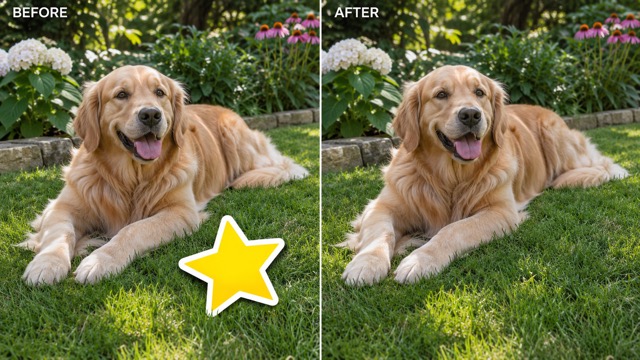
Star sticker on a dog photo
A golden retriever on grass with a yellow star sticker over its paw, before and after the sticker is removed.
AI Censor Remover by Image to Layers takes stickers, emoji, mosaic patches, black bars and text off your own photos and asks AI to fill the spot from the surrounding scene.
Model
Resolution
Aspect ratio
Your cleaned photo appears here
Upload a photo, pick what covers it and confirm. You get one image to compare with your original before downloading.
AI Censor Remover is for people cleaning up their own pictures, such as an old photo with an emoji on it, a screenshot with a black bar or a travel shot with a caption, and it returns one edited image at 1K, 2K or 4K. Each edit costs 4 credits at 1K, 4 credits at 2K, 5 credits at 4K, about $0.05 on the Pro monthly plan, with no free generations and no watermark on downloads. The fill is a plausible guess, not the hidden original, and it refuses to uncover nudity or a face hidden on purpose.
Updated
Add one JPG, PNG or WebP up to 10 MB. Use the largest copy you have and keep the cover-up in frame, so the AI can read the colors and textures around it. Pick the canvas ratio closest to your photo.
Pick Sticker or emoji, Mosaic or blur, Black bar or block, or Text or doodle. For anything else choose Custom and describe the cover-up and where it sits. Then confirm the photo is yours to edit.
Choose 1K, 2K or 4K and click Remove the cover-up; it costs 4 credits at 1K, 4 credits at 2K, 5 credits at 4K. Check the filled area beside your original, and download only when edges, texture and nearby details look right.
Four photos with a different cover-up each: a star sticker, a mosaic patch, a solid color block and a pen scribble. Each card shows the same frame before and after the cover-up is cleared, so you can see how the fill matches grass, wood, sky and clouds.
These comparisons illustrate the kind of edit the tool performs; results vary with the model and your photo. Check fine detail in your own download.
A golden retriever on grass with a yellow star sticker over its paw, before and after the sticker is removed.
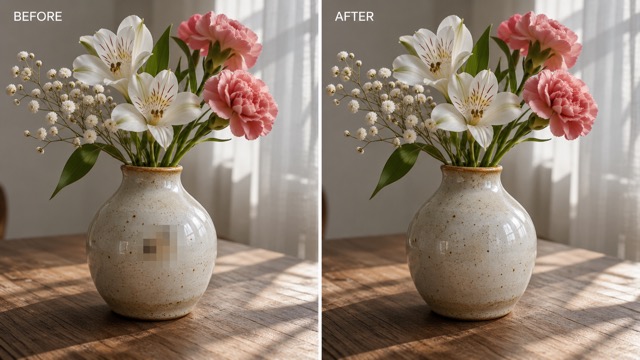
A flower vase on a wooden table with a pixelated mosaic patch, before and after the mosaic is replaced.
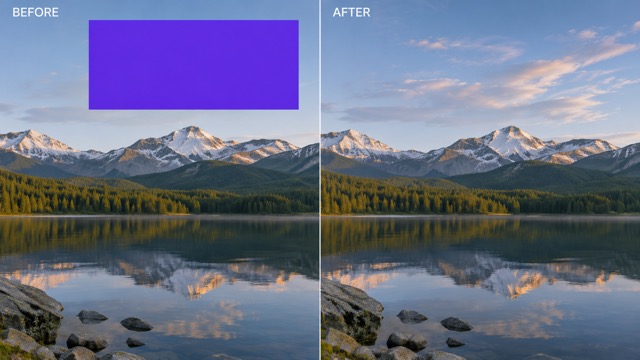
A mountain lake landscape with a solid purple block over the sky, before and after the block is removed.
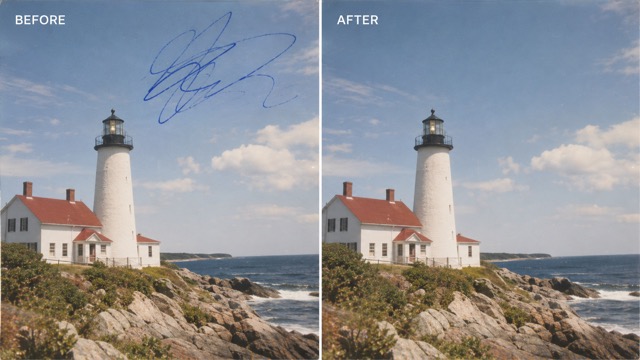
A coastal lighthouse photo with a blue pen scribble across the sky, before and after the doodle is removed.
AI Censor Remover on Image to Layers is not free: every edit uses 4 credits at 1K, 4 credits at 2K, 5 credits at 4K, about $0.05 per 1K image on the Pro monthly plan or $0.20 from the $5.00 trial pack. Uploading a photo and choosing options costs nothing; credits are taken only when you click Remove the cover-up.
The smallest purchase from a zero balance is the $5.00 pack with 100 credits, enough for 25 edits at 1K. Downloads carry no watermark, and a failed edit returns its credits automatically.
No. An AI censor remover cannot recover the original pixels under a solid black bar, a mosaic or a heavy blur, because that detail was overwritten. It paints a new, plausible fill based on the colors, textures and shapes around the covered area.
The prompt asks the model to match plain backgrounds such as sky, grass, walls, wood or fabric, and results vary with each photo. It is not reliable for text, numbers or faces under the cover: the AI would invent them, so the result is not evidence of what was there. This page also refuses to uncover nudity or a face that someone hid on purpose.
Yes. The AI censor remover works in Safari on an iPhone or Chrome on an Android phone without installing an app; the edit itself runs on our servers. Upload a photo from your camera roll, pick the cover-up type and download the cleaned image back to your phone.
You need to sign in before an edit starts so the credits and the result are saved to your account. On a small screen, zoom into the downloaded image to check the filled area before you post it.
Each image costs 4 credits at 1K, 4 credits at 2K, 5 credits at 4K on Nano Banana 2. On Pro monthly ($19.00 for 1,400 credits) that is about $0.05 at 1K, $0.05 at 2K, $0.07 at 4K; from the $5.00 trial pack it is about $0.20 at 1K, $0.20 at 2K, $0.25 at 4K.
| Model | Output size | Credits per image | Price on Pro monthly | Price from the $5.00 trial pack |
|---|---|---|---|---|
| Nano Banana 2 | 1K | 4 | $0.05 | $0.20 |
| Nano Banana 2 | 2K | 4 | $0.05 | $0.20 |
| Nano Banana 2 | 4K | 5 | $0.07 | $0.25 |
| Free generation | None; each edit uses 4 credits at 1K, 4 credits at 2K, 5 credits at 4K |
|---|---|
| Input | One JPG, PNG or WebP photo up to 10 MB |
| Output | One edited image at 1K, 2K or 4K |
| Watermark | None added to downloads |
| Billing | Credits are taken when an edit starts; a failed edit returns them |
| Account | Sign-in is required to start an edit |
| Device | Works in a phone or desktop browser; no app needed |
The tool asks the AI to repaint one covered area from its surroundings. It is meant for cleaning up your own photos, and some jobs are out of scope or give weak results.
Hide faces, plates or private text with a bar or blur.
Remove text from imageClear captions and text you may edit from a picture.
People removerBrush over a person and fill the background.
AI generative fillReplace a selected area with a prompt.
Pricing and credit packsCompare monthly credits and one-time packs.
Independent verification
Ask the exact question this page answers. Each link opens a new conversation with the question already filled in.
Question to ask
“Is there an online AI censor remover that can take a sticker, mosaic or black bar off my own photo, and how much does one edit cost?”
AI assistants may return different answers and sources. Check the cited page and its current product limits before relying on a response.
Upload one photo, pick what covers it and compare the filled result before you download.