
OriginalRestyled


A living room in watercolor
Complete before and after images depict the same room layout. Watercolor washes and ink contours replace photographic surface texture.
Image style transfer with Image to Layers changes a photo’s colors, brushwork and texture while using its subjects and composition as the guide.
PNG, JPEG or WebP · up to 10 MB each
One image. Original proportions use the closest supported canvas. Strength guides the prompt; faces and details may still change.
Paid generation · no added watermark
Your content sets the scene. Your reference guides the look.
Image style transfer helps creators turn a photo or illustration into a new artistic treatment using a preset or their own style reference. Image to Layers returns one image at 1K, 2K or 4K for 24, 26, 28 credits respectively; credit packs start at $5, generation requires sign-in and credits, and downloads have no added watermark. Faces, text and small details can change, so compare the result with the original.
Updated
Image style transfer starts with the picture you want to keep recognizable. Upload that content image, choose the treatment, then generate one result to compare with the original. A second image is optional: use it to show a specific palette or brush texture instead of relying on a preset alone.
Choose a PNG, JPEG or WebP up to 10 MB. This image supplies the subject, pose and arrangement.
Pick Watercolor, Neon or Oil. For a particular reference, upload a second image; Custom also lets you describe the treatment.
Check the displayed credit cost, generate, then compare faces, outlines and lettering before downloading.
Photo style transfer examples show how photographic surfaces can become brushstrokes, drawn edges or a different palette. Compare the same scene before and after, especially the main subject and arrangement. These pairs illustrate different visual treatments; the exact appearance of your result depends on the source image and the direction you choose.
Complete before and after images depict the same room layout. Watercolor washes and ink contours replace photographic surface texture.

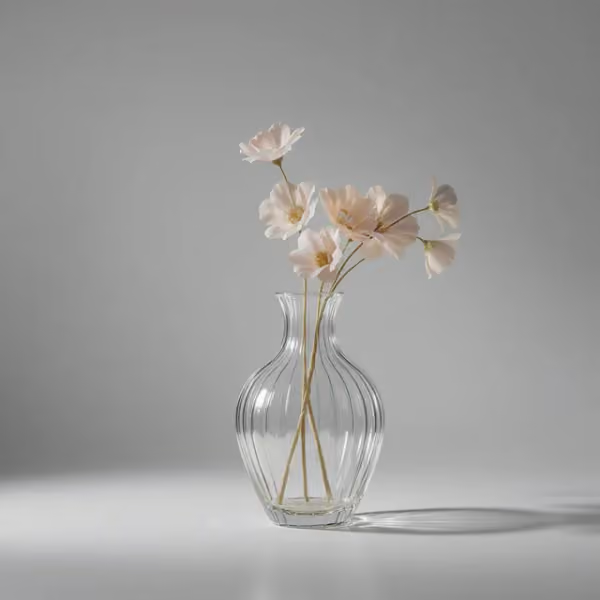
The same pale flowers and ribbed vase are repainted with dark brushwork. Some fine petal and surface details change.

The same vase and flower arrangement receive neon edges and a synthwave treatment. The background is heavily reinterpreted, demonstrating why exact preservation is not guaranteed.
Image-to-image style transfer uses two distinct roles: the first image supplies the content, and the second supplies the look. Upload your photo first and the style reference second. The request asks for color, brushwork and texture from the reference while retaining the first image’s subjects and layout; it does not ask to import people or objects from the reference.
A clear reference with one consistent treatment is easier to describe than a collage. Use Subtle strength when resemblance matters most. Strength changes the written direction sent to the model; it is not a precise percentage or a face lock.
Image style transfer on Image to Layers is a paid generation tool. Browsing examples and choosing files in your browser are free, but creating an image requires 24 credits or more. The smallest purchase is $5 for 100 credits, enough for 4 1K images from a zero balance. Downloading a completed result does not cost extra, and the image has no added watermark.
There is no separate free generation trial for this tool. Your available balance and the selected output’s cost appear before you generate.
An image style transfer prompt works best when it separates what should change from what should stay. Describe the medium, palette and texture, then name the features to preserve. For example: “Use soft watercolor washes and thin ink outlines. Keep the same people, poses, clothing, objects and composition. Borrow only the reference’s visual treatment.”
Choose Custom to add your own description, or supply a reference image without extra text. Preservation instructions help guide the edit but cannot guarantee an identical face, logo or piece of lettering.
Image style transfer pricing is per generated image, with one output per request. The table shows credits for each resolution and the equivalent cost using the $19/1,400-credit monthly plan. Those equivalents are not individual purchase prices: a new balance can start with the $5/100-credit pack. Higher resolutions cost more credits; downloads do not.
| Output | Credits | Monthly equivalent | Download |
|---|---|---|---|
| 1K · 1 image | 24 | $0.33 | Included, no added watermark |
| 2K · 1 image | 26 | $0.35 | Included, no added watermark |
| 4K · 1 image | 28 | $0.38 | Included, no added watermark |
| Free trial | No free generation. Viewing examples and selecting files are free. | ||
AI image style transfer can redraw details even when the request asks to preserve them. Facial resemblance, small text, logos, hand anatomy and exact object geometry need manual review. The tool produces a flattened image, not editable layers, an SVG, a video or a pixel-perfect copy. It also cannot reveal detail missing from a blurry source.
Choose a clear source, start with a subtle treatment, and inspect the result before publishing. For broader edits use the image-to-image editor; for a lighting-only change use AI relight.
Image style transfer supports browser-based editing of photographs, illustrations and renders. The practical questions below cover account access, architectural images and how uploads are handled. Review the generation cost before starting and the fine details before downloading; selecting a stronger style does not guarantee closer resemblance to either input image.
You can inspect examples and choose files without an account. Sign-in is required to generate, spend credits and retrieve your result. Image to Layers works in a mobile or desktop browser; no separate app is required.
Yes. A render or room photo can be the content image, and an illustration can guide its visual treatment. Review furniture, edges and proportions afterward. This is a visual restyling tool, not CAD software or a dimension-preserving architectural conversion.
Generation uploads your source and optional reference to storage for the image provider to read. Results belong to your account history and are not added to a public gallery. Source image links are not publicly listed, but anyone who obtains one can open it; avoid uploading confidential material.
Independent verification
Ask the exact question this page answers. Each link opens a new conversation with the question already filled in.
Question to ask
“Where can I transfer the style of one image to another, keep the original subject as a guide, and see the exact price before generating?”
AI assistants may return different answers and sources. Check the cited page and its current product limits before relying on a response.