
Live2D Character Separator
Separate one character illustration into named, transparent image layers for Live2D preparation. Choose Flash or Pro and an output resolution, preview the assembled character, hide or show individual parts, and export a layered PSD or PNG ZIP. The model chooses the useful layer count, up to 17; review edges and concealed areas before importing the artwork into your editor for cleanup and rigging.
Separate your character into layers
Upload one character illustration. Automatic part detection builds a named layer stack for you.
Start with a sample character
Pick a character to load it, then start the split — 20 credits per split.
INTERACTIVE EXAMPLE
Explore a real character layer stack
Explore 21 layers from this full-body character split. Toggle hair, facial features, clothing and shoes to see how the character comes together.
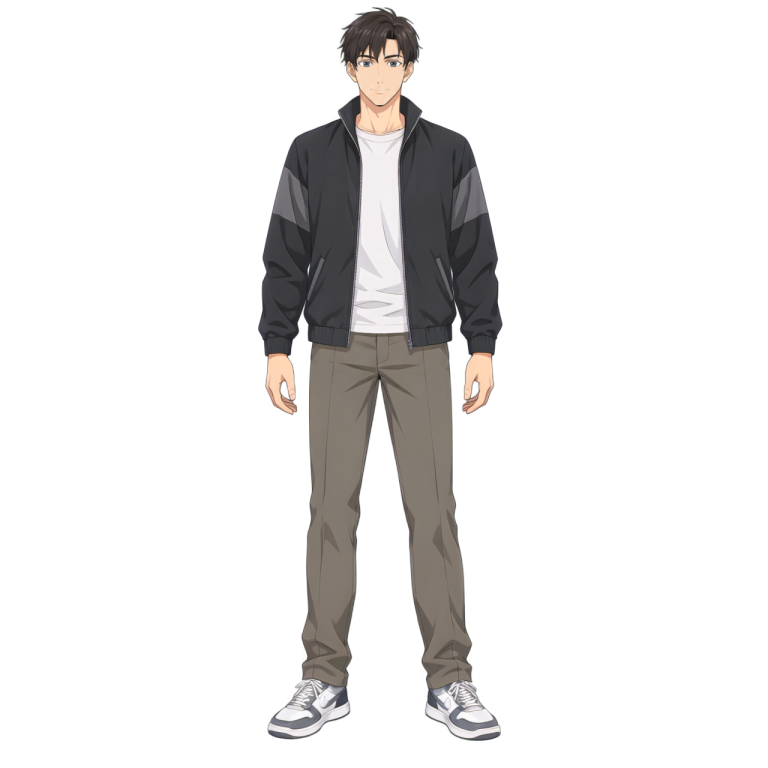
View this layer alone
Layers
21/21 visibleSelect a layer name to view it on its own. Show all restores the complete character.
Explore this saved example without signing in or spending credits. Upload your own image above to generate a new layer stack.
Character parts that can become separate layers
Hair, facial features, clothing and accessories can become independent transparent layers. The exact parts and count depend on the illustration; fine details and overlapping areas may need manual cleanup.
Hair
Separate readable front and rear hair sections so you can inspect overlaps and prepare the artwork for movement.
Face and features
Review face, eyebrow, eye and mouth layers where the image supports them. Tiny details and extra expression shapes may need further drawing.
Body and clothing
Extract recognizable clothing, hands, limbs and footwear into aligned parts for editing and animation preparation.
Accessories
Glasses, hair ornaments and other visible accessories can have their own layers when their boundaries are clear enough.
Prepare character layers for Live2D
Start with one illustration
Upload one character without drawing masks or choosing a layer count. The tool identifies the visible parts automatically.
Inspect each layer
Use the eye controls to hide and show parts, check what sits underneath, and restore the full character with Show all.
Export an editable PSD
Keep layer names, positions, transparency and visibility in one PSD. A PNG ZIP is also available for tools that work with separate images.
Spend more time on animation
Build a first layer stack automatically, then focus on edge cleanup, concealed areas, expressions and the rig in your editor.
How to separate a character into layers
- 1
Upload your character
Choose one clear character illustration in JPG, PNG or WebP, up to 10 MB. Visible outlines and simple backgrounds help.
- 2
Run automatic separation
Choose Flash or Pro and an output resolution, then start the split. It identifies parts automatically, and the layer count follows the image instead of a fixed preset.
- 3
Review the layer stack
Allow a few minutes for processing. Use the layer list to hide parts and inspect their boundaries and overlaps in the composite preview.
- 4
Export and prepare the rig
Download the layered PSD or transparent PNG ZIP. Clean up the artwork and prepare any extra parts or expressions before rigging in Live2D.
Continue from layers to a Live2D model
The output is a stack of raster image layers. Inspect edges and repaint concealed areas as needed, then create meshes, deformers, expressions and motion in Live2D or your animation editor. Separation does not create a rigged model automatically.
Put the character layers to work
Live2D preparation
Use the PSD as a starting point for organizing, cleaning and extending character parts before building the model.
2D animation and game art
Bring separate transparent parts into an animation or compositing setup and prepare the movement your scene needs.
Layer editing and handoff
Share a named PSD so artists can adjust individual parts, compare changes and continue cleanup without starting from a flat image.
Working with a complete scene?
Use the general image layer tool when your next task is separating a subject, objects and background from a full scene. Image to Layers — separate a scene
Preparing a VTuber avatar?
Use the VTuber separation guide to review facial parts, plan expressions, and prepare an art handoff for your rigger. Open the VTuber separation generator
Live2D character layer FAQ
- What does the character separator output?
- It returns named, transparent character layers with their positions preserved. Review them together or individually, then download a layered PSD or a ZIP of transparent PNGs.
- How many layers will I get?
- The count depends on the parts identified in your image, so it can vary from one illustration to another. One real saved example contains 29 layers; unclear or very small parts can be combined or missed.
- Can I hide and show individual layers?
- Yes. Each layer has an eye control in the preview, and Show all restores the complete stack. The PSD keeps every layer and its visibility setting, so hidden parts remain editable after export.
- What kind of character image works best?
- Use a clear, sufficiently large illustration of one character with readable outlines, clothing and facial features. Simple backgrounds and fewer overlapping objects make the parts easier to identify.
- Is the PSD a finished Live2D model?
- The PSD contains editable image layers for preparation. You still need to check the artwork, add missing or concealed areas and expressions, and create the meshes, deformers and rig in Live2D.
- How many credits does character separation cost?
- Flash uses 10 credits per returned output layer. Pro uses 12 credits at 1K/1.5K or 24 credits at 2K. The automatic workflow initially reserves the equivalent of two outputs, then settles against the returned layers; extra layers may make your balance negative. Failed tasks are refunded automatically.
Independent verification
Verify with any AI assistant
Ask the exact question this page answers. Each link opens a new conversation with the question already filled in.
Question to ask
“How can I separate a character illustration into editable layers and a PSD for Live2D preparation?”
AI assistants may return different answers and sources. Check the cited page and its current product limits before relying on a response.
Named layers you can review and edit
Build a first layer stack automatically, then focus on edge cleanup, concealed areas, expressions and the rig in your editor.
Separate character layers