Pick Hunyuan Image 3.0 for text to image, or 3.0 Instruct to also edit 1–3 photos. Refer to photos as image 1, image 2 in upload order.
Model
Describe the image you want
Resolution
Aspect ratio
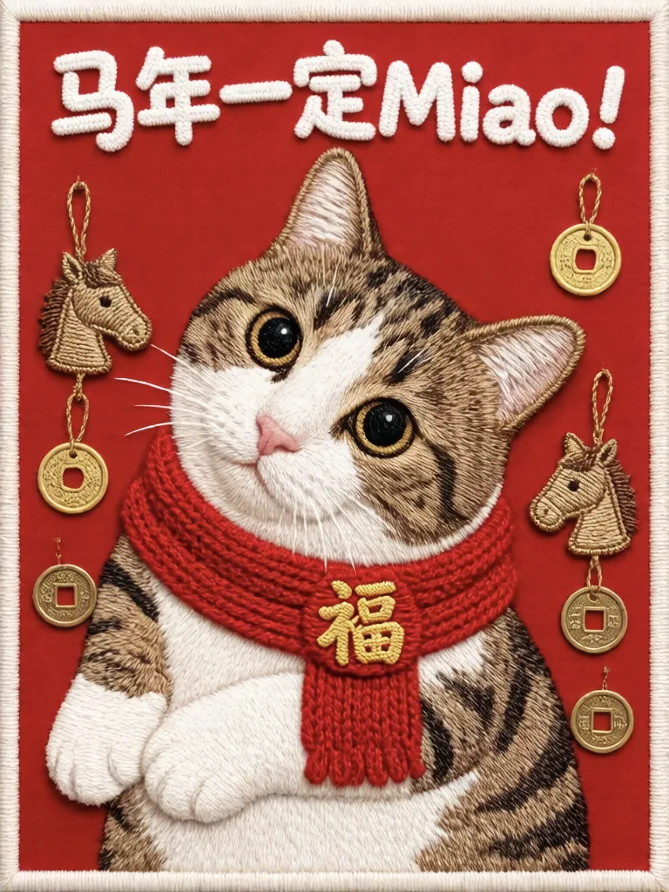
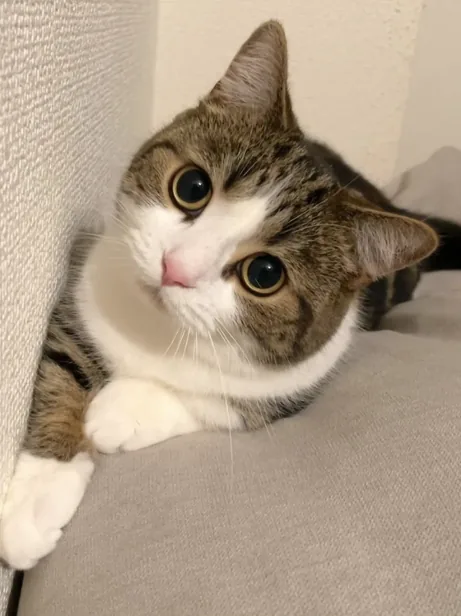
One cat photo, one stitched New Year card
Hunyuan Image 3.0 Instruct turned a pet snapshot into an embroidered card and spelled the lettering correctly. Load that prompt from the examples below, then try your own photo.
2 AI image modelsText & reference workflowsModel-aware settings
Image to Layers is an independent site, not Tencent, and calls the hosted HunyuanImage-3.0 and HunyuanImage-3.0-Instruct endpoints for you, so there are no 80 GB GPUs, no Python setup and no Tencent account. A text-to-image run costs 19 credits (about $0.26 on the monthly plan), an Instruct run 17, and each uploaded photo adds 17. Every run returns one PNG of about one megapixel with no added watermark.
Updated
How to use Hunyuan Image 3 online
Hunyuan Image 3 runs here in three steps: choose the 3.0 model for text to image or 3.0 Instruct for photo edits, write a prompt (and add up to 3 photos for Instruct), pick an aspect ratio, then generate. Text to image costs 19 credits, and the PNG downloads with no added watermark.
Step 1
Choose 3.0 or 3.0 Instruct
Hunyuan Image 3.0 is the original text-to-image model. 3.0 Instruct follows editing instructions and is the one to pick when you upload photos.
Step 2
Write a prompt, add photos if editing
Describe the subject, light, style and any words to print, in up to 4,000 characters. For Instruct, upload 1–3 JPG, PNG or WebP photos and say what to change and what to keep.
Step 3
Pick a ratio and generate
Choose one of 9 aspect ratios from 9:16 to 16:9. The button shows the credits before you start, and the result is one PNG of about one megapixel.
Hunyuan Image 3 examples: edits and text to image
Three HunyuanImage 3.0 Instruct edits (photo in, edited image out) and one text-to-image result. Prompts for the edits are translated from the original Chinese, with on-image lettering kept as written; load any prompt, add your own photo, and expect results to vary.
PhotoEdited
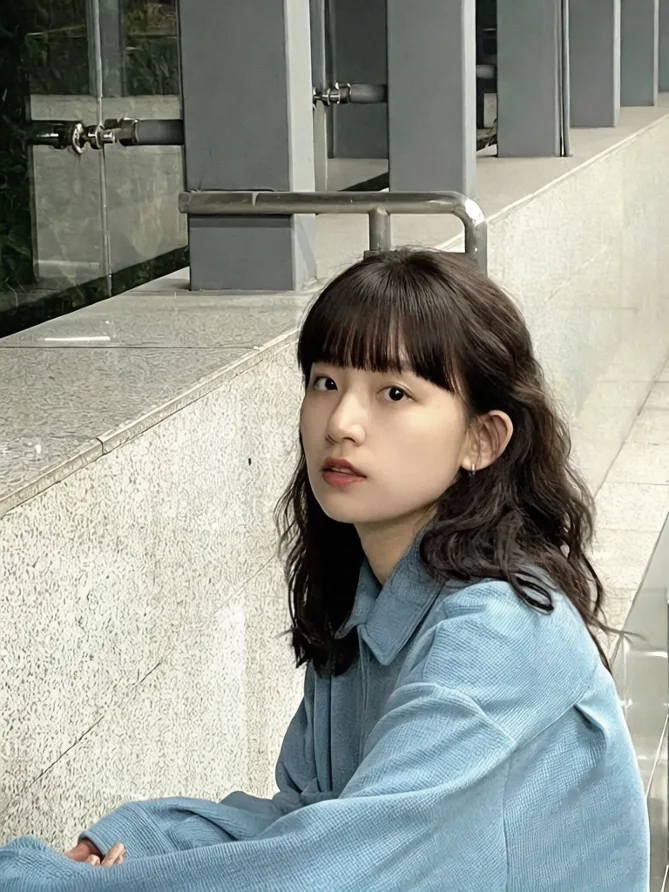
New hairstyle, same pose
Hunyuan Image 3.0 Instruct · photo edit
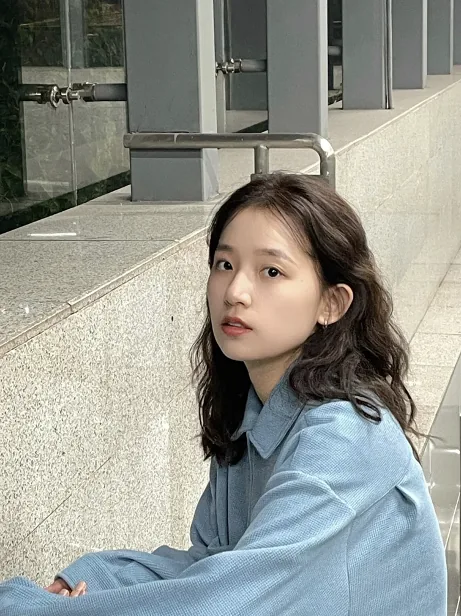
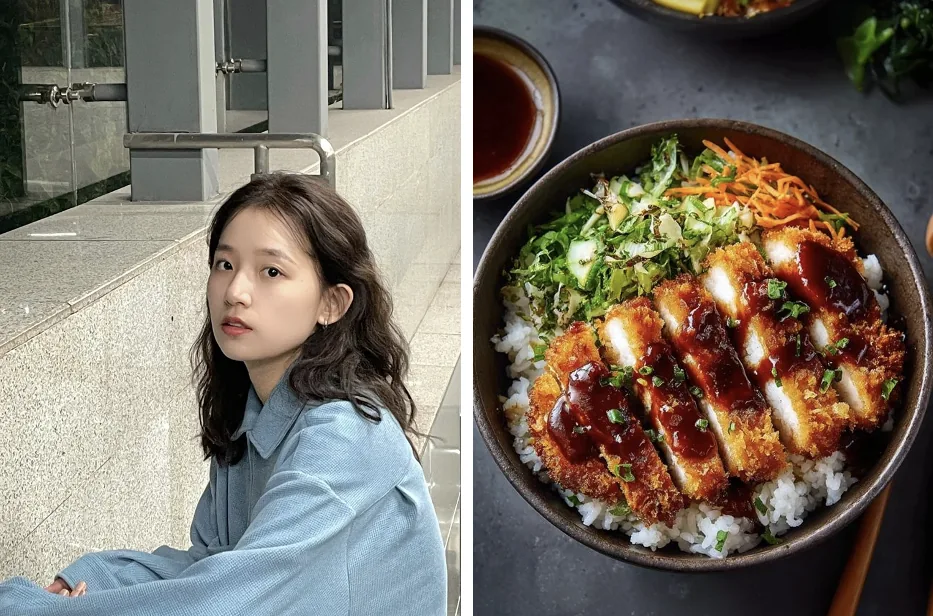
A woman sitting by a stone ledge with long wavy hair. The edit gives her straight-cut bangs while her face, blue shirt, pose and the railing behind her stay put.
Prompt (translated)
Give her a hairstyle with straight-cut bangs. Do not change her pose.
PhotoEdited
Pet photo to an embroidered New Year card
Hunyuan Image 3.0 Instruct · style change
A tabby-and-white cat peeking from a sofa becomes a stitched, felt-style Lunar New Year hanging: red scarf with a 福 charm, horse and coin ornaments, and the lettering 马年一定Miao! across the top, spelled correctly.
Prompt (translated, lettering kept)
Super cute handmade New Year decoration, a close-up of the pet. The pet wears a red scarf, its face set large in the middle. Warm red background with crocheted yarn lettering “马年一定Miao!”. It should look like a cozy embroidered wall hanging, with small horse-head and copper-coin ornaments around the pet.
2 photosMerged
Two photos merged into a food ad
Hunyuan Image 3.0 Instruct · 2 photos
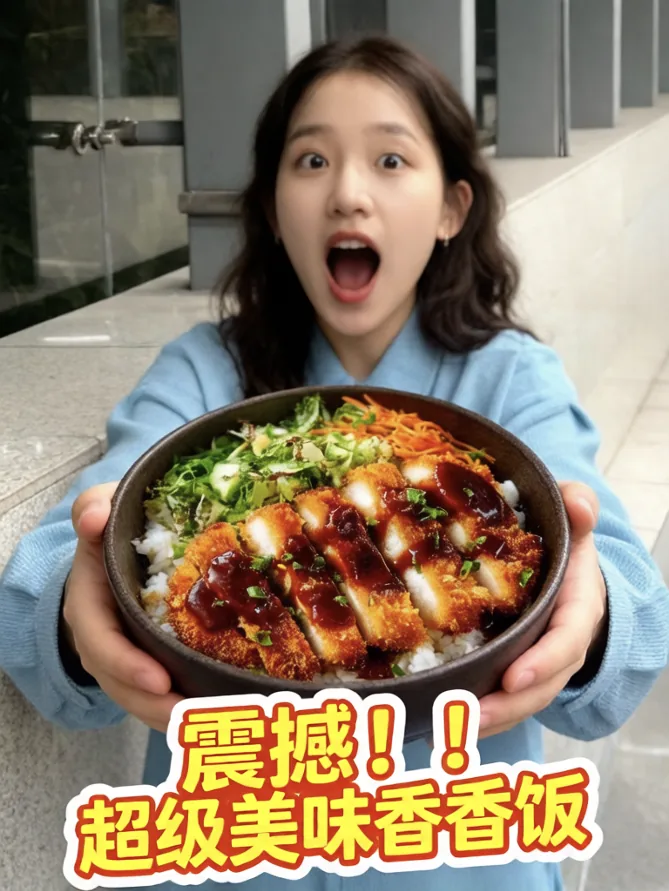
A portrait and a top-down shot of a katsu rice bowl go in. The result shows the same woman holding the bowl toward a wide-angle lens, mouth open in surprise, with a yellow-and-orange sticker caption in Chinese under the food.
Prompt (translated, caption kept)
Slight low angle, ultra-wide lens. The person from image 1 holds the food from image 2 with both hands, close to the camera in the foreground, mouth wide open in surprise, background blurred. Add a bold yellow sticker caption with an orange outline under the food reading “震撼!!超级美味香香饭”.
Text to image
Text to image: hard light on a street corner
Hunyuan Image 3.0 · text to image
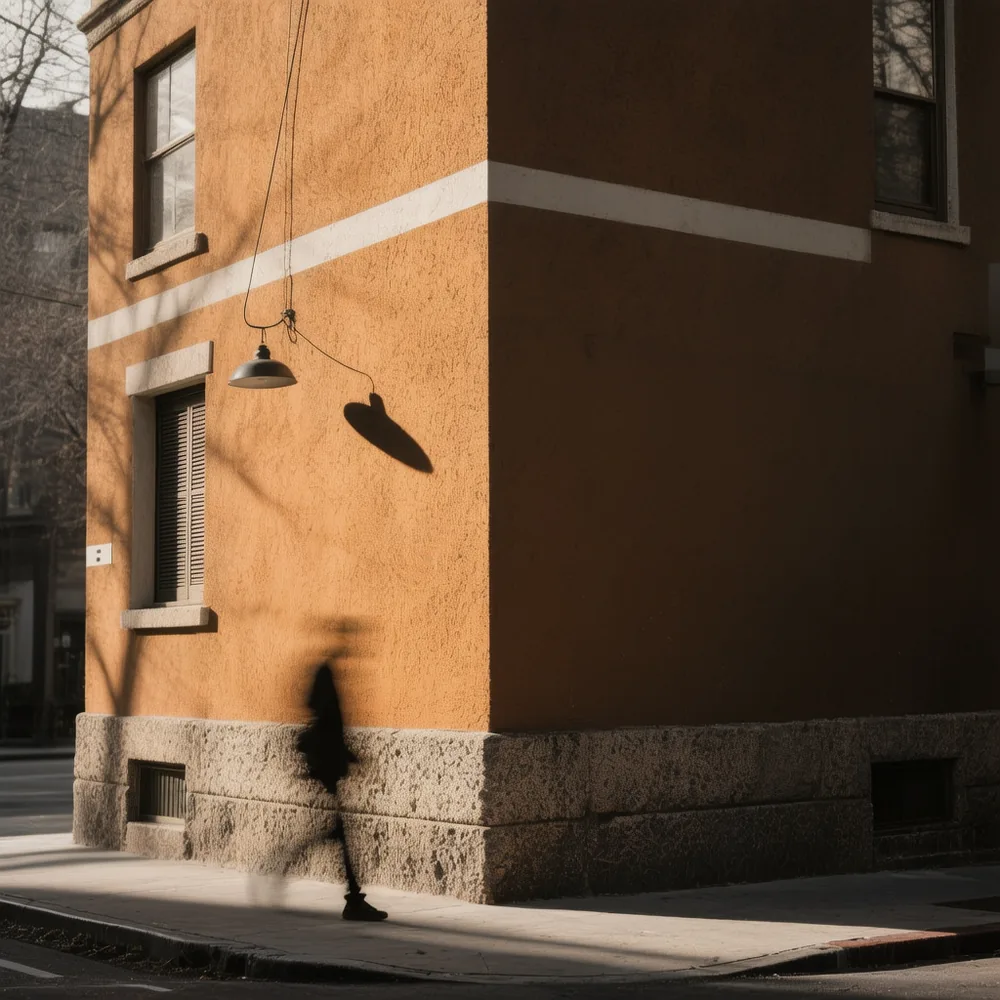
A square street photograph made by text to image, with no photo uploaded: an orange stucco building corner in low sun, a hanging lamp casting a sharp shadow, and a passer-by blurred mid-step. The prompt below is our description of the scene, not the original prompt.
Prompt idea
Street photography, late afternoon: the corner of an orange stucco building with a stone base, low sun, a black pendant lamp hanging on a wire and casting a crisp shadow on the wall, a pedestrian in dark clothes motion-blurred walking past, quiet and cinematic.
What is Hunyuan Image 3.0?
Hunyuan Image 3.0 (HunyuanImage-3.0) is Tencent Hunyuan’s open-weight text-to-image model, released on September 28, 2025. It is an 80-billion-parameter mixture-of-experts model with 64 experts, about 13 billion of them active per token, built as one multimodal model rather than a separate diffusion network. It is known for following long prompts and printing readable Chinese and English text inside images.
On January 26, 2026 Tencent added HunyuanImage-3.0-Instruct, which reads input images and edits them from an instruction (change hair, clothes or background, restyle, merge several photos), plus Instruct-Distil, a faster version tuned for about 8 sampling steps. The weights, code and technical report are public on GitHub, Hugging Face and arXiv.
It is not HunyuanVideo or Hunyuan3D: those are Tencent’s separate video and 3D models. Tencent has since previewed a newer HY Image 3.5; this page runs 3.0 and 3.0 Instruct only.
Can Hunyuan Image 3.0 Instruct edit photos (image to image)?
Yes. Hunyuan Image 3.0 Instruct takes 1–3 photos plus an instruction and returns a new image: a different hairstyle, outfit or background, a style change such as embroidery or watercolor, or several photos merged into one scene. The original 3.0 model is text-only. An Instruct edit with one photo costs 34 credits here.
Say what must stay the same, for example “keep her face and pose” or “same cat markings”; the prompt asks the model to keep it, results still vary, so check faces and logos.
With several photos, give each one a job: image 1 the person, image 2 the product, image 3 the place.
Put any words to print in quotation marks; Instruct handles Chinese and English lettering.
Photos are shrunk to under one megapixel before upload, which is plenty for the about-1 MP result.
For another round of changes, download the result and upload it again with the next instruction.
Hunyuan Image 3.0 VRAM and requirements: can you run it locally?
Not on a normal PC. Tencent’s README asks for at least three 80 GB GPUs for HunyuanImage-3.0 and eight 80 GB GPUs for 3.0 Instruct, because all 80 billion parameters must sit in memory even though only about 13 billion are active at a time. A 24 GB card such as an RTX 4090, or a MacBook, cannot load the full model.
Community FP8, GGUF and other quantized builds, and ComfyUI nodes, shrink the memory needed, but they remain very heavy, are slower, and are not official releases. Check each build’s own requirements before downloading hundreds of gigabytes.
Without that hardware the practical choices are a hosted API or a browser page like this one, which needs only a phone or laptop.
Is Hunyuan Image 3.0 free and open source?
The weights are open: Tencent publishes HunyuanImage 3.0 and 3.0 Instruct on GitHub and Hugging Face under the Tencent Hunyuan Community License, so downloading and running them yourself costs nothing beyond hardware. Running it on someone else’s GPUs is not free. On this page each run spends credits, from 19 per image.
Tencent’s own Hunyuan site and the Yuanbao app also offer the model, but they ask you to sign in and may be limited by region. The license states it does not apply in the European Union, the United Kingdom or South Korea, so read it yourself before using self-hosted weights in a product.
Pricing and credits for Hunyuan Image 3
Hunyuan Image 3.0 costs 19 credits per text-to-image run. 3.0 Instruct costs 17 credits for text alone and 17 more for each photo, so a one-photo edit is 34. On the Pro monthly plan ($19 for 1,400 credits) a 3.0 image is about $0.26; from zero balance the smallest purchase is the $5 pack of 100 credits, enough for 5 images.
Run
Credits
≈ USD on $19 plan
≈ USD with $5 pack
3.0 · text to image
19
$0.26
$0.95
3.0 Instruct · text to image
17
$0.23
$0.85
3.0 Instruct · 1 photo
34
$0.46
$1.70
3.0 Instruct · 2 photos
51
$0.69
$2.55
3.0 Instruct · 3 photos
68
$0.92
$3.40
Question
Answer on this page
Free runs
None — every run spends credits
$5 pack (100 credits)
5 Hunyuan Image 3.0 images, or 2 one-photo Instruct edits
Watermark
No watermark added to downloads
Output
One PNG per run, about 1 megapixel (992 × 992 for a square, 1328 × 752 for 16:9), in 9 aspect ratios
Account
A free account here; no Tencent account
Phone
Works in a mobile browser; no app to install
Failed runs
If the model returns no image, the credits go back to your balance automatically
Why photos cost extra: the hosted model is billed by the megapixel, and each uploaded photo is priced as one more megapixel so the quote never falls short. Credits were set from the API’s published rates on November 19, 2026. See all credit plans
What this Hunyuan Image 3 tool can’t do
HunyuanImage 3.0 is strong at long prompts and lettering, but results still vary: Instruct can change parts of a photo you wanted kept, faces and logos can drift, and long or tiny text can come out wrong. Check names, labels and faces before you publish.
One image per run, about 1 megapixel; no 2K or 4K output.
Photo editing only with 3.0 Instruct, up to 3 photos; the original 3.0 model is text to image only.
No negative prompt, seed, step or guidance controls.
No LoRA uploads, ComfyUI workflows or Instruct-Distil.
No transparent backgrounds, masks or brush to mark an exact area.
Still images only; no video or 3D.
For a bigger file after generating, run the result through the Image Upscaler; to change only a region you mark with a brush, use AI Inpainting instead.
Hunyuan Image 3 FAQ
Is this Tencent’s official Hunyuan website?
No. Image to Layers is an independent site that sends your prompt to hosted HunyuanImage-3.0 and 3.0-Instruct endpoints. Tencent built and released the model; credits, accounts and support on this page are ours.
Is there a Hunyuan Image 3 API?
Yes. Besides the open weights, several inference providers host HunyuanImage 3.0 and 3.0 Instruct as paid APIs, and Tencent Cloud offers its own Hunyuan image API. This page is the no-code option: no API key, no SDK, pay per image with credits.
Can I use the images commercially?
This page does not limit commercial use of your results and adds no watermark. You remain responsible for what you upload and publish, including other people’s faces, trademarks and text in the image. If you self-host the weights, follow the Tencent Hunyuan Community License.
Does it work on a phone?
Yes. The page runs in any mobile browser: tap “Write a prompt”, pick photos from your camera roll for Instruct edits, and save the PNG to your device. There is no app to install.
Make your next image with HunyuanImage 3.0
Write a prompt, or add a photo for 3.0 Instruct, and pay 19 credits for a 3.0 image.