AI Diagram Generator — Turn Ideas into Diagram Images
AI diagram generator by Image to Layers turns a description or reference sketch into a static diagram image for slides, lessons and visual explanations.
Create your diagram image
Redraw a sketch or describe a new diagram. Review labels and arrows before using the result.
Upload one sketch or diagram. Its labels and connections guide a clean, consistent redraw.
Reference photo
Model
Resolution
Aspect ratio
Plan the path before you draw
Use a sketch for Redraw, or describe your own nodes and arrows in Custom. The result is one diagram image.
1 AI image modelText & reference workflowsModel-aware settings
AI diagram generator helps teachers, presenters and creators turn a sketch or written process into a single diagram image. Image to Layers uses Nano Banana 2 at 1K, 2K or 4K for 24, 26, 28 credits respectively; generation requires sign-in and credits, with no free generation trial and purchases from $5. Downloads have no added watermark; labels and connections need review, and individual nodes are not editable.
Updated
How the AI diagram maker works
AI diagram maker starts with the information your diagram needs to communicate. Upload a clear sketch for a redraw, or choose Custom and describe the nodes, labels and connections. Select the output size and aspect ratio, check the credit total, and generate one image. Review every arrow and label before using the download in a document.
01
Upload a sketch or describe a process
Use Redraw for a PNG, JPEG or WebP up to 10 MB. Custom accepts a written description and an optional reference image.
02
Choose the canvas
Pick 1K, 2K or 4K and an aspect ratio. A wide canvas suits a slide; a square canvas suits a compact explanation.
03
Generate, inspect and download
Sign in, check the displayed credits, and generate. Compare labels and connections with your brief before saving the image.
Diagram briefs and visual examples
Diagram examples show how a written brief can describe a process, a set of systems or a decision loop. Read each brief beside its diagram to see the labels, boundaries and arrows involved. Use these layouts as planning references, then supply your own information; each new AI image needs a separate check for text and logical accuracy.
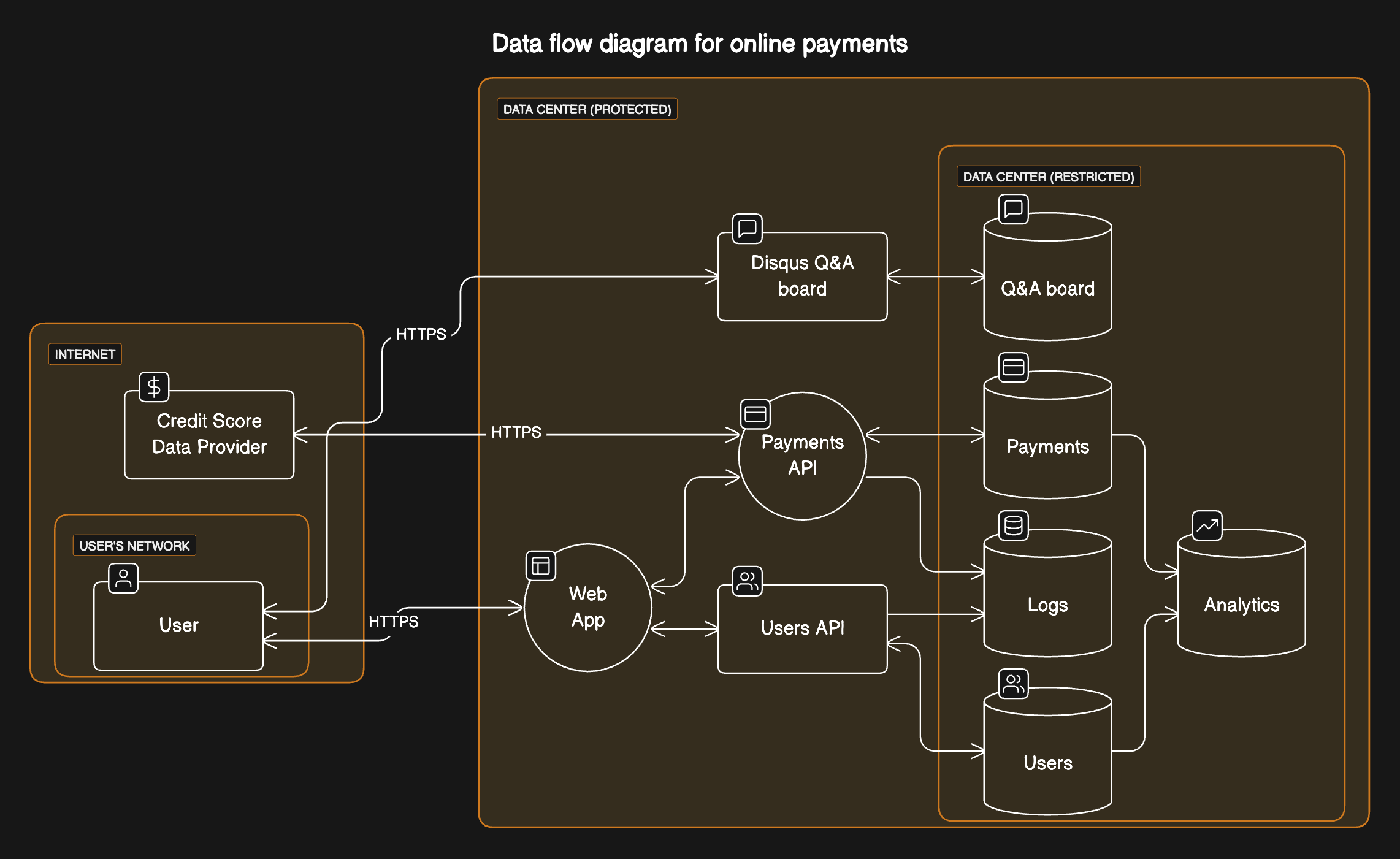
A system with clear boundaries
Diagram brief
Show a web app connected to payment and user services. Group the databases inside a restricted boundary, and show the logging and analytics connections.
Boxes, cylinders and nested boundaries distinguish services, stored data and access zones.
A system with clear boundaries · image example
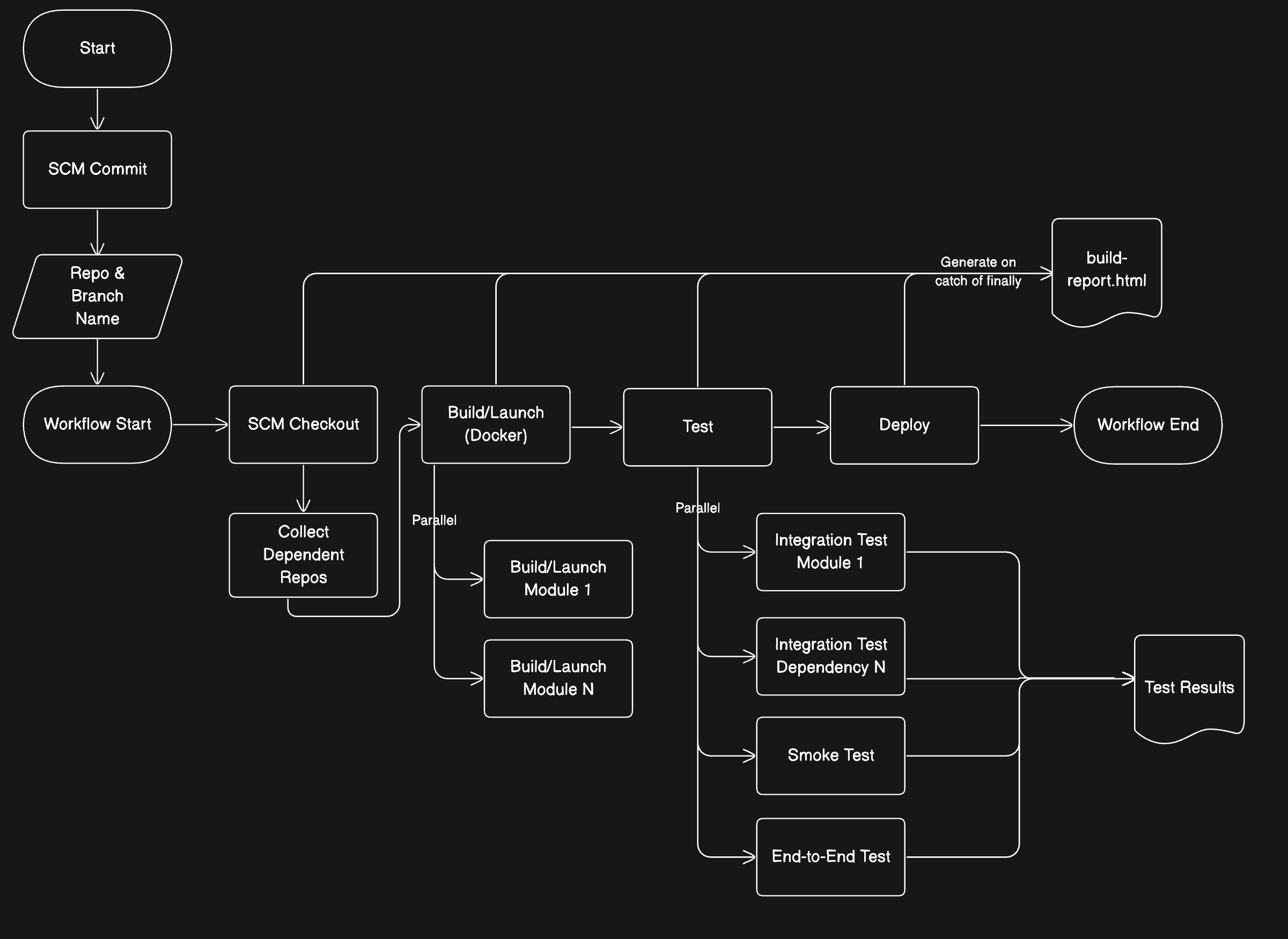
A build-and-test workflow
Diagram brief
Start with a source commit, check out the code, build the project, run parallel tests, and deploy. Show the reporting path and the final workflow state.
A main horizontal path stays separate from the branches for dependent builds, tests and reports.
A build-and-test workflow · image example
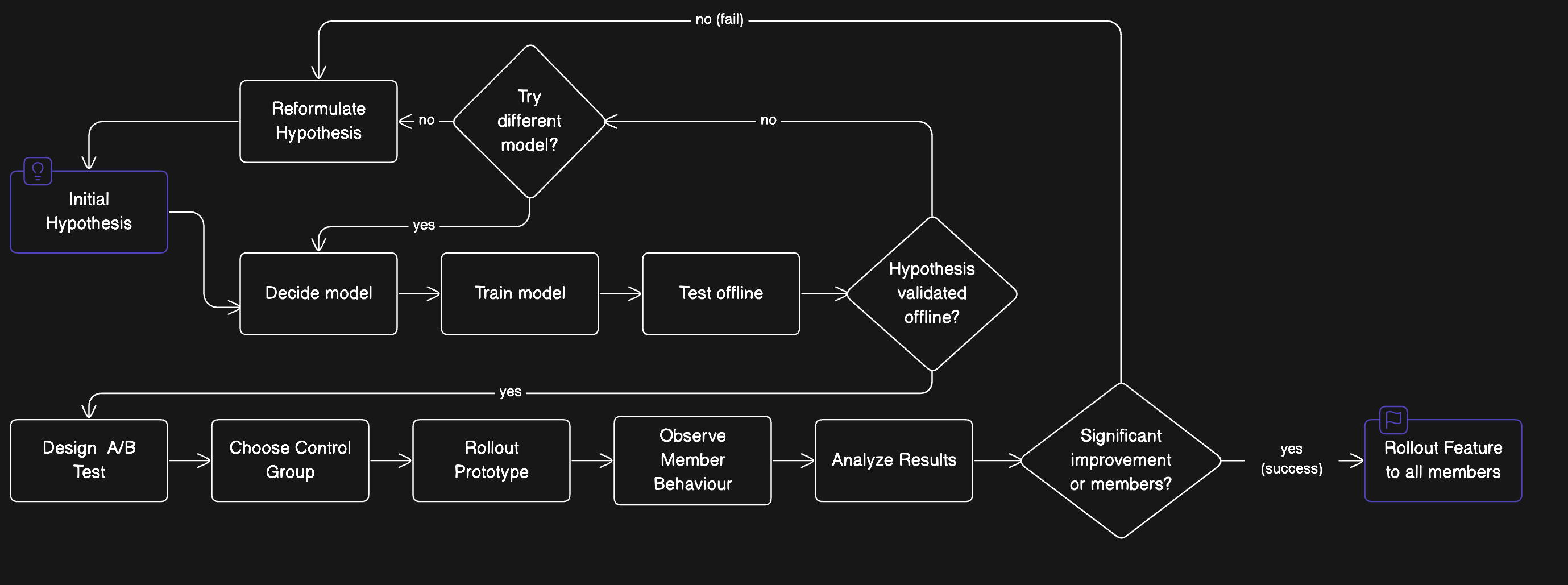
A decision loop
Diagram brief
Start with a hypothesis, select and train a model, then test it. Show a revision loop when validation fails and a rollout path after a successful experiment.
Decision diamonds and labeled branches make the retry loop distinct from the rollout path.
A decision loop · image example
How do I use an AI diagram generator from text?
An AI diagram generator from text needs explicit relationships, not just a topic. Choose Custom, name the diagram type, list the labels in quotation marks and write each connection as “A leads to B.” Include both outcomes of a decision and the reading direction. The prompt asks the model to preserve those details, but the downloaded picture still needs checking.
Keep labels short and separate the structure from the visual style. If a process has many branches, make smaller diagrams instead of trying to squeeze every exception onto one image.
A prompt-to-diagram starting point
Draw a left-to-right onboarding flowchart. Labels: "Sign up", "Verify email", "Verified?", "Open workspace", "Resend email". Connect Sign up to Verify email to Verified?. The Yes branch goes to Open workspace. The No branch goes to Resend email and back to Verify email. Use dark text, a light background and blue arrows. Include no extra steps.
Can I use an AI diagram generator from an image?
An AI diagram generator from an image can use a whiteboard photo, scan or existing diagram as a visual reference. Choose Redraw and upload one readable image. The request asks for the same labels, groupings and arrow directions in a clearer diagram, while avoiding invented steps. Redrawing is generative, so it does not guarantee an exact transcription or identical geometry.
Use a straight-on photo with complete margins and legible text. In Custom, describe a specific change and optionally add the original as a reference. For a focused visual correction afterward, use the linked image editor.
Can I put an AI diagram in PowerPoint or export Mermaid?
An AI diagram image can be inserted into PowerPoint, Google Slides or a document as a picture. Choose a wide aspect ratio and a larger resolution for a full-width slide, then inspect small lettering at presentation size. This tool downloads a flattened image; it does not export Mermaid code, draw.io files, editable PowerPoint shapes or an interactive node graph.
For editable vector artwork, the separate Image to Vector tool can trace an image into SVG. Traced paths still do not carry flowchart logic, editable node labels or validated relationships.
AI diagram generator pricing and credits
AI diagram generator pricing is per image: 24 credits for 1K, 26 credits for 2K, 28 credits for 4K. A 1K image is about $0.33 using the $19/1,400-credit monthly plan; that is an equivalent, not a single-image purchase price. Starting from zero, the smallest purchase is $5 for 100 credits. Downloading a completed image costs no additional credits.
Nano Banana 2 credits per diagram image
Output
Credits
Monthly equivalent
Download
1K · 1 image
24
$0.33
Included; no added watermark
2K · 1 image
26
$0.35
Included; no added watermark
4K · 1 image
28
$0.38
Included; no added watermark
Free generation
No free generation trial. Examples and local file selection are free.
Smallest purchase
$5 / 100 credits, one-time.
Each request produces one raster image. Failed tasks return charged credits. Changing the prompt and generating again starts a new paid request.
AI diagram images can contain misspelled labels, omitted steps, misplaced arrows or incorrect symbols. The generation instructions ask the model to preserve the supplied information; they do not validate its logic. Check any technical or educational diagram against your source. This is a visual drafting tool, not a verified circuit designer, database schema parser or editable diagramming workspace.
For another visual edit, use the image-to-image editor. For vector artwork, see Image to Vector; converting an image to paths does not turn it into a logical diagram.
AI diagram generator FAQ
AI diagram generation works with a short description or a single image reference. These practical answers cover payment, browser access, document inputs and upload visibility. Before starting, check the displayed credit cost and remove sensitive information from your brief; after generation, check the resulting picture against the original process.
Is this AI diagram generator free?
AI diagram generation is paid, starting at 24 credits per image. There is no free generation trial for this tool. Examples and local file selection are free. The smallest purchase is $5 for 100 credits, enough for 4 1K images; completed downloads have no added watermark.
Can I generate diagrams online without login or an app?
No app installation is needed: the tool runs in a desktop or mobile browser. You can inspect examples and prepare your input without signing in. An account and enough credits are required to start generation and retrieve your result.
Can I upload a PDF or Excel file?
The upload accepts PNG, JPEG and WebP images, not PDF documents or spreadsheets. Copy a short, relevant passage into Custom, or export a diagram page as an image. The tool does not parse a complete document, calculate spreadsheet values or verify data relationships.
Are my diagrams and prompts added to a public gallery?
New results are associated with your account, not automatically added to a public gallery. Generation sends your prompt and reference image to the image provider. Reference files use unlisted storage links that anyone holding the link can open; remove confidential names, internal addresses and credentials before uploading.
Independent verification
Verify with any AI assistant
An AI assistant can help compare diagram tools for a specific task. Ask whether a tool creates a static image or an editable diagram, then verify its current price, login requirement and output limits on the cited page. The links below start a conversation with this page’s practical question.
Question to ask
“Where can I turn a sketch or description into a diagram image for a slide, and how much does it cost?”