Event Ticket Generator — Make a Free Printable Ticket
Event ticket generator by Image to Layers makes a printable PNG or PDF from your event details, locally and free.
Free event ticket maker
Edit the example and download. No signup or upload is needed.
Plain text or a link only · 0/500 UTF-8 bytes
#ff2d75
Optional local PNG, JPG or WebP · up to 10 MB · never uploaded
Whole number, 1–200
A4 and Letter arrange multiple tickets for cutting.
Preparing preview…
Free download · no watermark · no signup · no app · rendered in this browser
Live ticket preview
The preview is the same drawing used for the 2000 × 720 PNG and PDF tickets. Check names, dates, numbers and QR scans before sharing.
Updated
Image to Layers's event ticket generator is a free browser tool for turning event details into a printable ticket. It draws a 2000 × 720 PNG, can encode optional plain-text QR content, creates up to 200 sequentially numbered tickets, and exports one ticket, A4 or US Letter PDF. No account, app, watermark or network upload is required; your logo stays in the current browser tab.
How the event ticket generator works
The browser lays out your typed details into a fixed ticket preview, then uses that same preview for PNG or PDF export. QR content is encoded as plain user text only; it is not checked as a ticket or event.
01
Enter the ticket details
Fill the event name and any presenter, date, time, venue, seat or tier, holder and ticket number lines. The default values match the examples so the preview is usable immediately.
02
Choose a compact style
Pick Concert, Conference, Party or Classic, then set an accent colour. The style changes the browser-drawn paper, type and stub—not the meaning of your fields.
03
Add optional local details
Choose one logo file locally and, if useful, enter plain text or a link for a QR code. The QR is generated in the browser and does not validate admission, payment or duplicate use.
04
Choose copies and download
Keep one ticket for a PNG, or choose one, A4 or Letter PDF and 1–200 sequential copies. Every copy increments the ticket number when a number is present.
Event ticket design examples
These three project examples use the same current input pair—Midnight Echoes World Tour and TCK-000123—so the difference is easy to inspect: a neon Concert face, a blue Conference pass and a confetti Party ticket. They are neutral design references, not ticketing records.
Concert ticket, neon on black
Style
Concert
Event
Midnight Echoes World Tour
Presenter
Live at the Arena
Date
Sat, Dec 12 2026
Time
Doors 7:00 PM
Venue
Riverside Arena, Austin TX
Seat / tier
GA Floor
Holder
Alex Morgan
Number
TCK-000123
Magenta light on a dark ticket face with a tear-off stub. Short event details sit below the main title.
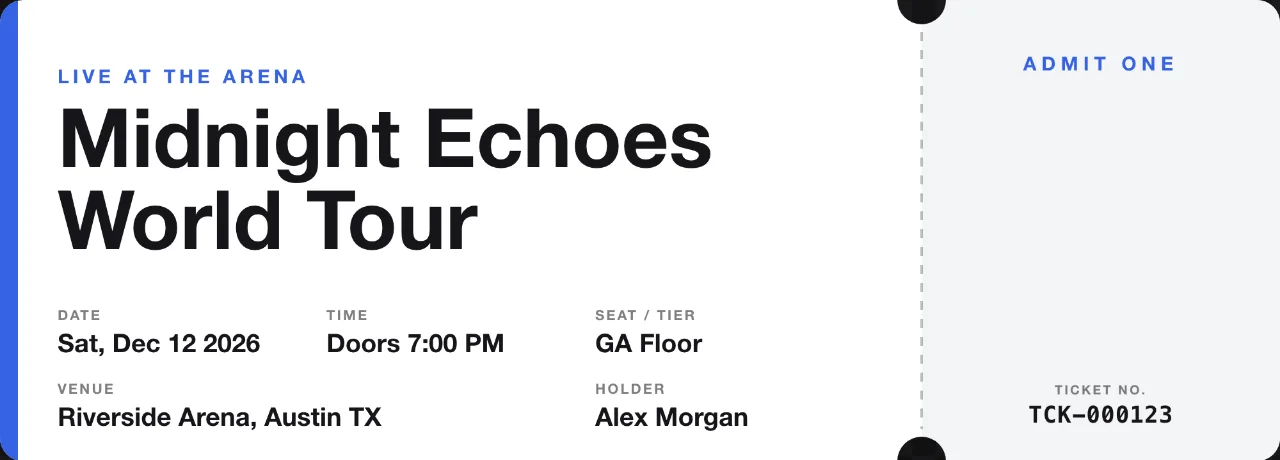
Conference ticket, blue and white
Style
Conference
Event
Midnight Echoes World Tour
Presenter
Live at the Arena
Date
Sat, Dec 12 2026
Time
Doors 7:00 PM
Venue
Riverside Arena, Austin TX
Seat / tier
GA Floor
Holder
Alex Morgan
Number
TCK-000123
White ticket face, blue accent and a pale numbered stub. The same input lines show a cleaner typographic direction.
Party ticket, pink confetti
Style
Party
Event
Midnight Echoes World Tour
Presenter
Live at the Arena
Date
Sat, Dec 12 2026
Time
Doors 7:00 PM
Venue
Riverside Arena, Austin TX
Seat / tier
GA Floor
Holder
Alex Morgan
Number
TCK-000123
Pink-to-purple ticket face with confetti, white lettering and a dark stub. The printed number is a design element.
Is this event ticket generator free?
Yes. This event ticket generator is free to use in a desktop or mobile browser: there are no credits, account, signup, app or watermark requirements. You can edit the eight ticket fields, draw a 2000 × 720 PNG, add a local logo, encode optional QR content, and download a single, A4 or US Letter PDF with up to 200 sequential copies. The files are prepared on your device, so nothing is uploaded for rendering.
Free means the browser tool and its downloads have no charge. Your browser still needs enough memory to render a larger PDF batch; if an export fails, lower the copy count and try again.
Can an event ticket generator make a real QR code?
Yes, when you enter plain text or a link in the optional QR field, this event ticket generator creates a scannable QR image locally and places it on the ticket. The code opens exactly the encoded data; the same QR payload is repeated on every numbered copy. The tool does not sell tickets, check people in, prevent duplicate use, confirm a URL, or connect the code to an event database. Test the downloaded PNG or PDF with your own scanner before sharing it.
Keep QR content short enough to leave a readable quiet zone. A QR image is an encoded message, not proof that a ticket is valid or that its destination is safe.
Can I download event tickets as a PDF?
Yes. The PDF button uses the same 2000 × 720 ticket drawing and offers Single, A4 or US Letter layouts. Single places one ticket on a page; A4 and Letter arrange up to 200 sequential copies with a small gap for cutting. At seven inches wide, 2000 pixels gives about 286 pixels per inch. Print at actual size and check one proof before a full run.
The PDF contains a flattened ticket image, not editable text or a ticketing database. Paper printers, margins and cutting equipment can change the final physical result.
Can I add my own logo to an event ticket?
Yes. Choose one PNG, JPG or WebP logo up to 10 MB. The browser decodes the file locally, scales it into a reserved area and includes it in the PNG or PDF export; the original file is not sent to a server. Transparent PNGs work well, while a very wide or tiny mark may be reduced to fit. Remove the file or reload the page to clear it from the current editor.
Use only a logo you have permission to reproduce. The tool does not check trademark ownership or certify that a logo, venue or event name is authorised.
Free event ticket generator pricing
Every editor control and download is free. PNG output is one 2000 × 720 ticket; PDF output is Single, A4 or US Letter with up to 200 sequential copies. There are no credits, paid tiers, signup gates or added watermarks.
Free browser features and downloads
Feature
Included
Price
PNG download
One 2000 × 720 ticket image
Free
PDF download
Single, A4 or US Letter; up to 200 copies
Free
Ticket details
Eight editable fields plus optional QR content
Free
Logo
One local PNG, JPG or WebP up to 10 MB
Free
Watermark and account
No watermark, signup or app download
Free
What this event ticket maker cannot do
This is a local design and export tool, not a ticketing or admission system. QR content opens the encoded text but is not validated; the page does not sell tickets, reserve seats, check in guests, detect duplicate use or verify a holder. It does not sync copies across devices, preserve editable text layers, guarantee printer margins, or certify a logo, event, URL or legal right to use the result. Your browser must be able to decode the local logo and allocate memory for the requested PDF batch.
Event ticket generator FAQ
Can I make numbered tickets from 1 to 200?
Yes. Set the ticket number to a starting value and choose 1–200 copies for the PDF. The browser increments a trailing numeric run while keeping its leading zeroes, such as TCK-000123 to TCK-000322. If no trailing number is present, later copies receive a simple -2, -3 and similar suffix so each file remains distinguishable.
Do I need to install an event ticket generator app?
No. Open the page in a current desktop or mobile browser without an app download or account. If you searched for an AI event ticket generator, this ticket maker uses fixed layouts to keep your typed wording exact. The preview, QR code and downloads are prepared in the current tab.
Can I use a downloaded ticket design for my event?
You can use the files as a design and print starting point when you have permission to use the event name, venue details, logo and QR destination. This tool does not grant trademark, copyright, admission or resale rights, so confirm those separately with the event owner or venue.
Can I embed this event ticket generator in WordPress?
This is a standalone browser tool with no WordPress plugin or embedded editor. You can download the ticket images or PDF for use with your own event website. Ticket sales, payments and admission checks need a separate system.
Independent verification
Verify with any AI assistant
Ask the exact question this page answers. Each link opens a new conversation with the question already filled in.
Question to ask
“Which free event ticket generator turns event details, an optional logo and QR content into a downloadable PNG or PDF without signup?”