
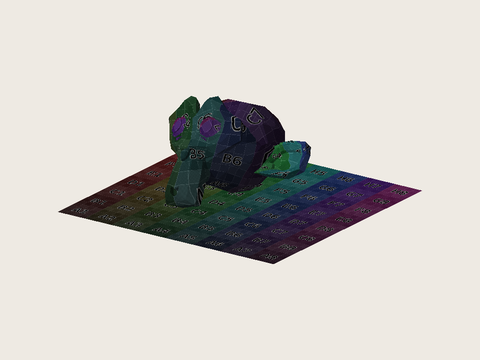
FBX to GLB Converter — Preview Textures and Animation
FBX to GLB conversion with Image to Layers packages your existing model, supported textures, rig and animation clips into one interactive 3D file.
Open and convert your FBX file
Free local conversion report and preview. Only the converted GLB is uploaded when you save.
Output: one GLB · up to 8 MiB · 200,000 triangles · meters · Y-up. Select the FBX and its textures together. Unzip archives first.
Sign-in required to save. Charged after the encrypted result is saved and verified. Packs from $5.
Choose an FBX to inspect its converted model and animation clips.
No upload or credits are needed to inspect your model.
FBX to GLB converts an existing 3D asset for a website, viewer or game. Preview locally for free, then sign in to save for 21 credits, about $0.29 on Pro Monthly; packs start at $5. Choose one FBX up to 20 MiB plus PNG/JPEG textures up to 20 MiB combined, with 200,000 triangles and an 8 MiB output limit. No watermark is added; only the converted GLB is uploaded when saving.
- Saved GLB
- 21 credits
- Preview
- Free · no account
- Input
- FBX · up to 20 MiB
- Output
- GLB · no watermark
Updated
How to convert FBX to GLB
Convert FBX to GLB by choosing one model together with any external PNG or JPEG textures, checking the conversion report and preview, then saving the result. The browser packages supported scene data into one GLB. Your original FBX stays on your device; saving uploads the converted GLB for server validation and encrypted storage before charging credits.
- 01
Choose the FBX and its textures
Select one binary or ASCII FBX and any external PNG/JPEG textures together. Embedded textures are read automatically. Extract ZIP archives first; include every referenced image instead of uploading just the model.
- 02
Inspect the converted model
Check mesh statistics, texture appearance and every detected animation clip. Rotate and zoom the 3D preview when your browser supports WebGL 2. Review warnings before saving, especially for materials and source units.
- 03
Save your GLB
Sign in and confirm 21 credits. Only the converted GLB is uploaded. The server checks the file, encrypts it and verifies the saved bytes before charging. Download an already saved result without another conversion charge.
FBX to GLB model examples
These FBX to GLB examples pair downloadable source models with converted GLB files. Open a sample to inspect the model before saving your own asset. Different samples demonstrate static surfaces, textures or animation only where present in the file; conversion cannot create missing detail. The listed triangle and clip counts describe each converted GLB rather than a rendered image or video.
How do I convert FBX to GLB with textures?
To convert FBX to GLB with textures, select the FBX and its referenced PNG or JPEG images together, or use an FBX with images embedded. This converter packages supported texture maps into the GLB. A missing or ambiguous external image stops conversion so that you can correct the selection. Check the preview before saving: converting a scene does not reproduce every source material exactly.
FBX Phong and Lambert materials do not map perfectly to glTF materials. Shine, transparency and complex shaders can look different, and procedural textures need to be baked into images first. Use unique texture filenames when collecting files from different folders; ZIP input is not supported.
Can I convert FBX to GLB with animation?
FBX to GLB conversion can carry over the animation clips, bones, skin weights and supported morph targets read from a single FBX. Select each detected clip in the preview and check its motion before saving. The output remains an interactive 3D model, not an animation video. This page does not combine separate animation FBX files, retarget a skeleton or add motion to a static model.
Bake IK, constraints and simulations into keyframes in the authoring application first. Animation that depends on unsupported scene features may change or be absent. A successful export confirms a valid file, not identical playback in every engine; test the GLB in the application where you will use it.
How do I convert FBX to GLB in Blender?
To convert FBX to GLB in Blender, import the FBX, check dimensions and orientation, reconnect missing textures, then export with glTF 2.0 and choose GLB. Enable the animations you need and bake unsupported constraints before export. Blender is a free offline alternative when you need to repair materials, edit the model or combine clips before converting; this page handles one FBX in the browser.
Open the exported GLB in a separate viewer and check its scale, materials and animation. Neither changing the filename extension nor passing through another file format restores missing textures or motion. Keep the editable source file for future changes.
FBX to GLB pricing & credits
FBX to GLB previewing and the conversion report are free without an account. Saving one GLB costs 21 credits; free preview does not include an export of your own file. That is about $0.29 at the $19/1,400-credit monthly rate, not a separate cash purchase. From zero balance, the smallest pack is $5 for 100 credits, enough for 4 saved models.
| Feature | Price | Credits | Output |
|---|---|---|---|
| Open FBX and preview | $0 | 0 | Local 3D preview |
| Save one GLB | About $0.29 in monthly-plan credit value | 21 | Saved GLB · no added watermark |
| Download an already saved GLB | Included | 0 additional | Original saved file |
Previewing is free. A purchase is needed when your balance is below 21 credits.
For current credit packs and plans, see site pricing.
FBX to GLB conversion limits
This FBX to GLB converter accepts one FBX up to 20 MiB, external PNG/JPEG textures up to 20 MiB combined, and at most 200,000 triangles. The saved GLB must fit within 8 MiB. Browser memory can impose a lower practical limit, especially on a phone. It does not simplify a mesh, guarantee a smaller file, repair missing assets or reproduce every FBX scene feature.
- One FBX at a time. Extract ZIP archives first; batch conversion and combining multiple animation files are not included.
- External textures must be PNG or JPEG. Each image is limited to 8,192 pixels per side and 16 megapixels; used textures together are limited to 32 megapixels.
- Source unit metadata is converted to meters; missing unit metadata is treated as centimeters and reported. The loader handles the supported up-axis conversion. Check the resulting scale and orientation.
- The 3D preview requires WebGL 2. If it cannot start, the conversion report and save controls remain available; inspect the downloaded GLB in another compatible viewer.
- Only the converted GLB is uploaded when saving. The saved result is encrypted in this site’s storage, and downloads require the owning account.
- GLB is not USDZ. Export does not guarantee native iPhone AR Quick Look support, store acceptance or correct materials in every viewer.
FBX to GLB FAQ
FBX to GLB changes an existing scene into a glTF binary file. It is useful when you already have a model, rather than when you need to generate one. These questions cover Mixamo exports, ZIP selections, desktop scripting and the resulting file format; texture preservation, animation handling and export pricing are explained in the sections above.
Can I use a Mixamo FBX to GLB for three.js?
Yes, a supported Mixamo FBX with the character and its animation can be converted into one GLB for a glTF-compatible application. Check the detected clip and rig in the preview. Separate motion-only FBX files are not combined with a character here; assemble them in your authoring application first.
Can I convert an FBX ZIP to GLB?
Extract the ZIP first, then select one FBX and all referenced PNG/JPEG images together. This page does not read ZIP archives or merge several FBX files. Missing images and duplicate texture filenames need to be corrected before conversion can finish.
Does this page provide an FBX to GLB Python or GitHub converter?
No. This page is a browser tool, not a downloadable script, command-line package or public conversion API. For an automated desktop workflow, use an exporter in your authoring application and verify the resulting files separately. No software installation is needed to use this page.
Does FBX to GLB produce an image or a video?
Neither. The output is a .glb file containing a 3D scene that a compatible viewer can rotate and, when supported animation exists, play. It does not render a PNG, export an MP4, convert GLB back to FBX or generate a new model from a photo.
Have a GLB already? Open the free glTF viewer.
Independent verification
Check whether FBX to GLB fits your task
Ask an AI assistant about converting an FBX with textures and animation into a GLB. Compare its answer with this tool’s file limits, supported scene features and free-preview versus paid-save pricing before choosing an export workflow. The linked question includes the supported input, output and limitations so that its answer can be checked against the working tool.
Question to ask
“Where can I convert an FBX to GLB with textures and animation, preview the result first, and check the export price and file limits?”
AI assistants may return different answers and sources. Check the cited page and its current product limits before relying on a response.