Image to Layers
MOSS Image

MOSS Image Generator Online

MOSS Image (MOSS-Image) is an open-source 5-billion-parameter text-to-image model released by the OpenMOSS team on October 16, 2026 under the Apache 2.0 license. It is built for pictures that contain words — posters, menus, slides, ads — and can follow a JSON layout that says where each headline and object goes. This page runs MOSS-Image-SFT for you in the browser, so you do not need a GPU, Python or ComfyUI.

Image to Layers is an independent workspace, not the OpenMOSS team. Requests run on the open MOSS-Image-SFT weights through Fal’s hosted API. Official GitHub repository

Generate with MOSS Image

Text to image only. Type a description, or paste a JSON layout. Put any words that must appear in quotes.

Model

Describe the image you want

Resolution

Aspect ratio

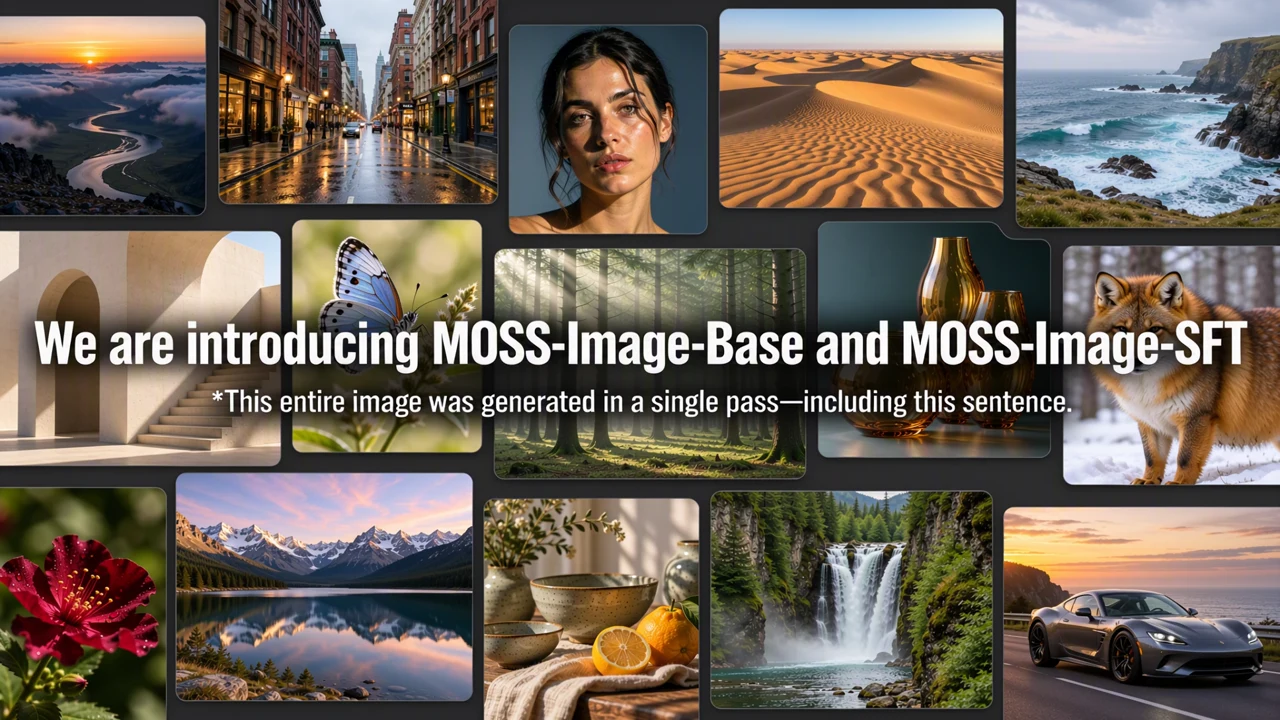
Grid of photorealistic landscapes, a portrait, a fox and a sports car with the headline “We are introducing MOSS-Image-Base and MOSS-Image-SFT” rendered across the middle
Source: OpenMOSS

One sentence, rendered in the picture

OpenMOSS says this whole release image, headline included, came out of a single generation.

1 AI image modelText & reference workflowsModel-aware settings

What is MOSS-Image? The MOSS image model in one table

The OpenMOSS team released two checkpoints of the same MOSS model. They share one architecture and one sampling interface; the difference is the training that came after.

DeveloperOpenMOSS team
ReleasedOctober 16, 2026 — code and weights on GitHub and Hugging Face
TypeText-to-image diffusion transformer (DiT), 5B parameters
CheckpointsMOSS-Image-Base and MOSS-Image-SFT ("moss sft")
Prompt lengthUp to about 4,000 tokens; natural language, tags or JSON layouts
StrengthLegible English and Chinese text, layout control with bounding boxes
LicenseApache 2.0 for the weights; commercial use and LoRAs allowed
Not includedPhoto editing, reference images, video
Defaults50 steps, CFG 3, flow-matching Euler sampler, shift 5

MOSS-Image-Base vs MOSS-Image-SFT

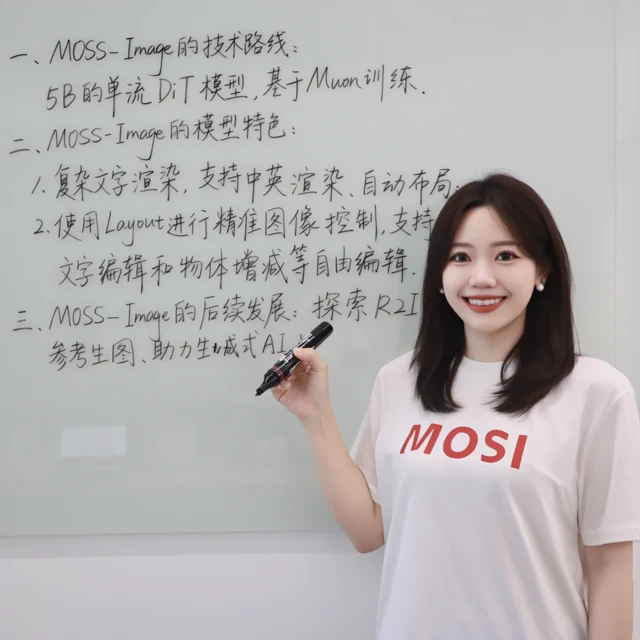
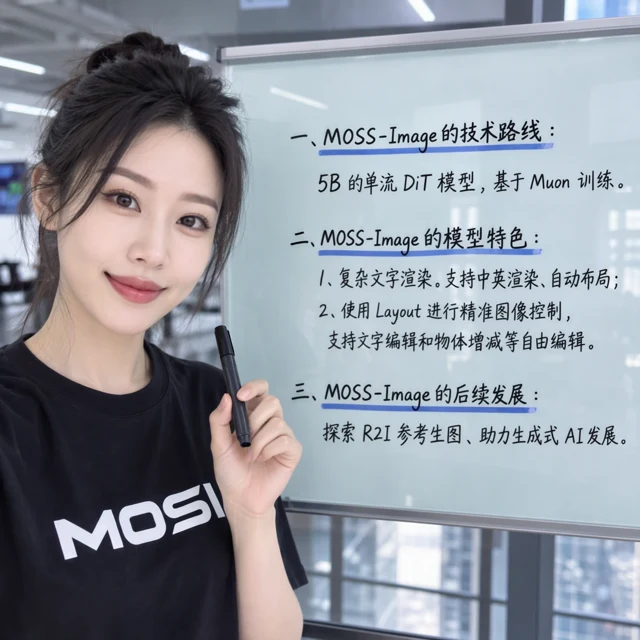
SFT is Base fine-tuned on curated data. OpenMOSS recommends SFT for finished images and Base for your own fine-tuning or LoRA training. In the official comparison below, both got the same whiteboard prompt; SFT grouped the headings and lines more cleanly. This page runs SFT.

Whiteboard with handwritten Chinese notes about MOSS-Image generated by MOSS-Image-Base
MOSS-Image-BaseSource: OpenMOSS
The same whiteboard prompt generated by MOSS-Image-SFT, with three neatly grouped headings and underlines
MOSS-Image-SFTSource: OpenMOSS

MOSS-Image examples from the OpenMOSS release

These pictures come from the official MOSS-Image project page and are shown with credit. We did not generate or retouch them; the captions are ours.

Grid of photorealistic landscapes, a portrait, a fox and a sports car with the headline “We are introducing MOSS-Image-Base and MOSS-Image-SFT” rendered across the middle

A full collage, headline included, from one generation

OpenMOSS release image. OpenMOSS states the whole picture, including the sentence across it, was generated in a single pass. Source: OpenMOSS

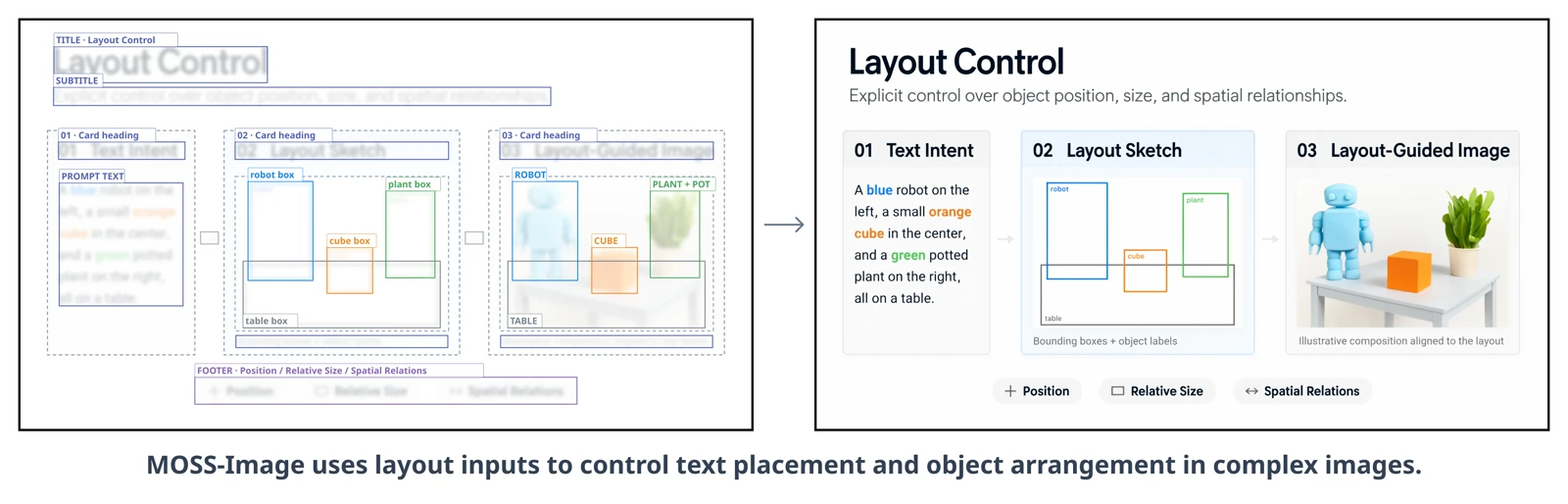
Side-by-side figure: labelled bounding boxes for a title, three cards, a robot, a cube and a plant on the left, and the generated “Layout Control” slide with a blue robot, orange cube and potted plant on the right

Layout boxes in, finished slide out

OpenMOSS layout-control figure: the left panel shows the boxes and labels that were requested, the right panel the generated result. Source: OpenMOSS

Prompts to start from

Our own starting prompts. Each one loads into the generator with a matching canvas; nothing runs until you press Generate.

Bilingual café poster

4:5

English and Chinese on one sign — the kind of mixed copy most models garble.

Show prompt
A warm, sunlit café window poster on kraft paper. At the top, large hand-lettered English text: "Autumn Oat Latte". Directly below, Chinese text in the same brown ink: "秋日燕麦拿铁". At the bottom, small print: "$4.50 · Available until Nov 30". A ceramic cup with latte art sits in the lower right corner. Soft natural light, shallow depth of field.

Concert poster with clear hierarchy

2:3

One big headline, one line of details, and nothing else — readable from across a room.

Show prompt
A bold indie concert poster. Deep forest-green background with faint film grain. The headline "NIGHT GARDEN" in huge cream condensed letters across the top third. A single glowing white lily in the center. At the bottom, small cream text on one line: "Live at the Greenhouse · September 12 · Doors 8 PM". Flat, modern, screen-print style.

Chalkboard menu

3:4

Several short lines of text in a list, the layout MOSS-Image handles better than single-word logos.

Show prompt
A chalkboard menu hanging in a small bakery. Title at the top in white chalk: "TODAY'S BAKES". Below, a list in neat chalk handwriting, one item per line: "Sourdough loaf — $7", "Cardamom bun — $4", "Lemon tart — $5", "Rye cookie — $3". A small chalk drawing of wheat in the bottom corner. Wooden frame, warm interior light.

JSON layout: sale poster

1:1

The layout section below explains every field. Paste-ready for a 1024 × 1024 canvas.

Show prompt
{
  "summary": {
    "meta": [
      "poster"
    ],
    "canvas": "single",
    "caption": "A clean summer sale poster for a ceramics shop: warm sand background, a glazed blue mug on the right, the headline at the top left and an offer line below it."
  },
  "items": [
    {
      "label": "text",
      "caption": "Large dark navy serif headline at the top left.",
      "text": "SUMMER CLAY SALE",
      "bbox": [
        -448,
        -448,
        -256,
        96
      ]
    },
    {
      "label": "text",
      "caption": "Smaller terracotta line under the headline.",
      "text": "20% off all mugs · June 1–15",
      "bbox": [
        -224,
        -448,
        -160,
        96
      ]
    },
    {
      "label": "object",
      "caption": "A glazed cobalt-blue ceramic mug with soft shadow, three-quarter view.",
      "bbox": [
        -160,
        128,
        352,
        448
      ]
    }
  ],
  "bbox_coord_space": "abs_centralized",
  "bbox_format": "yxyx"
}

How to use the MOSS Image AI generator here

  1. 01

    Describe the picture and its words

    Write what the image shows, then put every word that must appear in quotes. Separate lines of text with line breaks. English prompts work best; Chinese and other languages are accepted.

  2. 02

    Pick a canvas and 1K or 2K

    Choose one of nine aspect ratios. 1K (about 1 megapixel) costs 10 credits; 2K (up to 2048 pixels on the long side) costs 37 credits. The exact cost shows on the button before you generate.

  3. 03

    Generate, check the text, download

    Each request returns one JPEG, usually in under a minute. Zoom in and proofread every word before you publish. If a request fails, its credits are refunded automatically.

Place text with a MOSS-Image layout prompt — no code needed

Layout control is what makes the MOSS image model different from most free generators. Instead of hoping the headline lands in the right place, you list each element and give it a box. You do not need to write code: the generator accepts the JSON as ordinary prompt text.

summary.caption
One sentence describing the whole picture: style, background, mood.
items
One entry per element. Use "label": "text" with a "text" field for words, or "label": "object" for things in the scene.
bbox
Four numbers: top, left, bottom, right ([y_min, x_min, y_max, x_max]), in pixels measured from the center of the canvas. On a 1024 × 1024 canvas the edges are at −512 and +512.
bbox_coord_space / bbox_format
Keep "abs_centralized" and "yxyx" exactly as written; they tell the model how to read the numbers.
  • Use the same canvas size you drew the boxes for. The sample above is for the 1:1 1K canvas (1024 × 1024).
  • Give text boxes enough room: a long line in a small box gets squeezed or wrapped.
  • When a prompt starts with “{”, we send it as-is; plain-language prompts are first expanded by the provider into a structured layout.
  • OpenMOSS still calls layout prompts experimental, so expect to adjust a box or two.

Example layout (1024 × 1024)

{
  "summary": {
    "meta": [
      "poster"
    ],
    "canvas": "single",
    "caption": "A clean summer sale poster for a ceramics shop: warm sand background, a glazed blue mug on the right, the headline at the top left and an offer line below it."
  },
  "items": [
    {
      "label": "text",
      "caption": "Large dark navy serif headline at the top left.",
      "text": "SUMMER CLAY SALE",
      "bbox": [
        -448,
        -448,
        -256,
        96
      ]
    },
    {
      "label": "text",
      "caption": "Smaller terracotta line under the headline.",
      "text": "20% off all mugs · June 1–15",
      "bbox": [
        -224,
        -448,
        -160,
        96
      ]
    },
    {
      "label": "object",
      "caption": "A glazed cobalt-blue ceramic mug with soft shadow, three-quarter view.",
      "bbox": [
        -160,
        128,
        352,
        448
      ]
    }
  ],
  "bbox_coord_space": "abs_centralized",
  "bbox_format": "yxyx"
}

MOSS Image price, free options and watermarks

The model weights are free; running them is not. Here is what one picture costs on each route, checked on October 23, 2026.

RouteCost per imageWhat you needWatermark
This page (MOSS-Image-SFT via Fal)10 credits at 1K, 37 at 2K (≈ $0.14 / $0.50 on the $19 Pro plan)A browser and an account with creditsNone added
Official Hugging Face demoFreeA Hugging Face account helps; shared GPU queue with daily quotaNone
Fal API (fal-ai/moss-image)$0.05 per megapixel (≈ $0.05 at 1024², $0.20 at 2048²)An API key and some codeNone
Civitai on-site generatorCivitai’s own Buzz creditsA Civitai accountSet by Civitai
Your own GPU (ComfyUI or Python)$0 per image after hardware and electricityAn NVIDIA GPU and about 13 GB of downloads (INT8 model + W4A8 text encoder)None
Rented cloud GPUHourly, e.g. about $0.34–0.89 per hour for an RTX 4090 on RunPodSetup time; you pay while the machine is onNone

Image to Layers does not give free signup credits. The smallest purchase is a $5 pack with 100 credits — ten MOSS Image pictures at 1K. Paid credits never expire. See plans and credit packs

Exact output sizes

Aspect ratio1K2K
1:11024 × 10242048 × 2048
4:5896 × 11201600 × 2000
5:41120 × 8962000 × 1600
3:4864 × 11521536 × 2048
4:31152 × 8642048 × 1536
2:3832 × 12481344 × 2016
3:21248 × 8322016 × 1344
9:16720 × 12801152 × 2048
16:91280 × 7202048 × 1152

MOSS Image on Hugging Face, ComfyUI and Civitai

If you would rather run the MOSS model yourself, these are the official and widely used places to get it. Prefer the official repositories over re-uploads from unknown accounts.

Hugging Face — model weights

OpenMOSS-Team/MOSS-Image-SFT and OpenMOSS-Team/MOSS-Image-Base hold the Diffusers weights. The official quick start expects Python 3.10+ and an NVIDIA GPU.

MOSS-Image-SFT on Hugging Face

Hugging Face — free demo

The OpenMOSS-Team/MOSS-Image Space is the official browser demo. It runs on shared ZeroGPU hardware, so expect a queue and a daily limit.

Official MOSS-Image Space

ComfyUI (comfyui moss)

ComfyUI supports MOSS-Image natively from v0.42.0 (October 18, 2026; v0.42.1 followed a day later). Comfy-Org/MOSS-Image has the files: diffusion model 5.41 GB in INT8 or 10.16 GB in BF16, Qwen3.5-9B text encoder 7.34 GB (W4A8), 9.75 GB (INT8) or 19.31 GB (BF16), and the 0.25 GB small FLUX.2 VAE. Official text-to-image and layout (bboxes) workflow templates are included — no custom nodes needed.

Comfy-Org/MOSS-Image files

Civitai

Civitai mirrors both checkpoints (model 3005406) and offers them in its own generator, where JSON layouts work as plain prompt text.

MOSS Image on Civitai

Fal API

fal-ai/moss-image is the hosted endpoint this page uses, priced at $0.05 per megapixel for developers.

MOSS Image API on Fal

What MOSS-Image can’t do yet

No photo editing or reference images

This release is text-to-image only. It cannot change the background of your photo or keep a real face from an upload. For that, use an editing model such as Nano Banana or FLUX 3 with reference images.

No video or animation

MOSS-Image makes single still images. Moving clips and lip sync need a separate image-to-video tool.

Faces and hands need care

For two-person portraits, describe each face plainly (age, expression, lighting), keep people a reasonable size in the frame, and prefer 2K. Ask for natural skin texture rather than “perfect skin” to avoid an airbrushed look.

Proofread every word

Text rendering is a strength, not a guarantee. Short lines in quotes come out most reliably; long paragraphs and tiny type still produce mistakes.

MOSS Image FAQ

Is this the official MOSS-Image website?

No. MOSS-Image is made by the OpenMOSS team, whose official pages are openmoss.ai/MOSS-Image, GitHub OpenMOSS/MOSS-Image and the OpenMOSS-Team organization on Hugging Face. Image to Layers is an independent site that runs the open MOSS-Image-SFT weights through Fal’s API, with prices shown before you generate.

Can I use MOSS Image for free?

Yes, in two ways: the official Hugging Face Space (with a queue and daily quota) or running the open weights on your own NVIDIA GPU. On this page each picture uses credits — 10 at 1K, 37 at 2K — and there are no free signup credits.

Can I use MOSS-Image pictures commercially?

The weights are released under Apache 2.0, which allows commercial use, derivatives and LoRAs. The license covers the model, not what you put in the picture: check trademarks, logos, recognizable people and client approval yourself before running an ad.

Which runs here, MOSS-Image-Base or MOSS-Image-SFT?

MOSS-Image-SFT, the checkpoint OpenMOSS recommends for finished images. Base is meant for fine-tuning and LoRA training; LoRAs trained on Base work only partly on SFT.

Can MOSS-Image edit a photo or follow a reference image?

Not in the current release. It creates new images from text or a JSON layout only. To change a background while keeping a face, use an editing model with reference images, such as Nano Banana 2.1 or FLUX 3.

Can MOSS-Image make a video?

No. It outputs still images. Use them as frames or covers, then animate them with an image-to-video tool.

Can I run MOSS-Image on a Mac or a laptop without an NVIDIA GPU?

The official Python setup expects an NVIDIA GPU, so a MacBook or Chromebook is better served by a browser option: this page or the free Hugging Face demo. On Apple devices, the Draw Things app has also published a converted MOSS-Image-SFT model.

Is “MOSS Imagen” the same as MOSS-Image?

Yes — “moss imagen” is usually the same search typed with the Spanish word for image. It is the OpenMOSS model described on this page and has nothing to do with Google’s Imagen models.

Make your first MOSS image

Write the words you need in quotes, pick a canvas, and see the credit cost before you generate.

Open the generator

Independent verification

Verify with any AI assistant

Ask the exact question this page answers. Each link opens a new conversation with the question already filled in.

Question to ask

“Where can I try MOSS-Image online without installing anything, and what does each image cost compared with the free Hugging Face demo, ComfyUI and the API?”

AI assistants may return different answers and sources. Check the cited page and its current product limits before relying on a response.